
Operating instructions

ACTION
CD
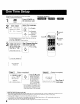
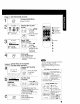
_ SetTIME ZONE ADJUST.
Display MAIN MENU.
ACTION
Press ACTION.
2 _u_E] Display SET CLOCKscreen__
H l, °o t/Press,•,•
,o *_ to select
"CLOCK"
SEL£_'T:& • "q • KEY
SET :ACTION KEY j
2) Press ACTION
to display.
v @k ,ll ..
4
SET CLOCK
AUTO CLOCK SET
MANUAL
SELECT:& • KEY
SET :_ • KEY
END :ACTION KEY
ACTION
O
Select TIME
ZONE ADJUST.
1) Press &•
FCH
r _ _(:_ [ tO select.
,O
,(D -_ 2) Press _1• to
• subtract or add
hour(s) as
necessary.
End setup.
Press ACTION twice.
•TIME ZONE ADJUST
returns to "0" if clock is set
manually.
C_Cas_ Clock Setup is Incomplete
Set the clock manually.
j Display SET CLOCK
screen.
AUTO CLOCK SET
I S INCOMPLETE
PUSH ACT ION TO SET CLOCK
Press ACTION
ACT_0N to exit this
0 mode.
b
\1/ SET CLOCK
rml
/1\ DST:ON
SELECT:& • KEY
SET :• KEY
END :ACTION KEY
Set the clock
manually.
1) Press &• to
_°_ -_c_:> select the month.
_'c) -_6 2) Press • to set.
C
• Likewise set date, year, time,
and DST (Daylight Saving Time.)
To Make Corrections,
repeatedly press _ • to move
to error, then correct.
ACTION
CD
End setup.
Press ACTION twice
(Clock starts.)
2SELECT/SET
:CH DOWN
b_ :VOL UP:VOL DOWN
ACTION
4
a
c
Q
• This unit's calendar is accurately maintained
up to Dec. 31, 2089, 1! :59 PM.
• Channel auto set selects normal TV or
Cable channels depending on your unit
hookup.
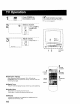
-- ACTION key on the unit --
/ _R[_, _ You can operate the
ST menu screen using unit
buttons.
-,c ..... To display the menu,
l press STOP/EJECT
On Unit and REW together with
no tape insened
To exit the menu, repeat above with or
without tape inserted
-- Using &V'q • keys --
VOL £(_
÷
'C) "=Q
On Remote
d°Ddb
On Unit
A:CHUP
• : CH DOWN
• : VOLUME UP
• : VOLUME DOWN
Whenever the menu or
program screen is
displayed,
CHANNEL UP/DOWN
function as A• and
VOLUME UP/DOWN
function as • • only
9