
Operating instructions
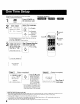
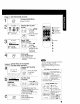

When the unit is turned on the first time, setup
mode is entered automaticai}y
1 I _ Press POWER on
the remote or unit.
SELECTLANGUAGE
PUSH CH • :English
OPRIMfR CH • :EspaSol
APP. VOL + :Fran_aJs
Select the language.
,_- - for English
v
_0 for Spanish
FVOL {EspaSot)
,(_ -for French
+ (Frangais)
• If wrong language is set, complete "Reset all unit Memory
Functions" steps page 35.
• If you use a cable box, it must be left on.
CONNECT ANTENNA CABLE
AND IF YOU USE A CABLE
BOX, TUNE I T TO YOUR
LOCAL PBS CH THEN..
Start Channel Auto Set
and Clock Auto Set.
CR I Press CH A"
@
Process of Setup
POWER1
,2CHANNEL
UP
2 CHANNEL
DOWN
2 VOLUME
UP
L
CH AUTO SET PROCEEDING
AUTO CLOCK SET
PROCEEDING
(Setup completed)
6/712000WEDosT:oN CH
SETTING : OH 10 (_
AUTO CLOCK SET .i.
COMPLETEO!I!III
END: PUSH CH U
Press CH • to exit.
• If your area observes
daylight saving time,
but you would like to
turn the DST feature
oft, complete the
"To Set or Reset the
Clock" step on page
34 and set DST: OFF.
• If your area observes daylight saving
time and DST is set to ON, but the
time Js incorrect; complete the Time
Zone Adjust steps on the next page
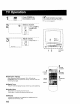
Case2_ (Setup incomplete)
1
AUTO CLOCK SET /
/
IS I NCOMPL_TE
See Case 2
PUSH ACTION TO SET CLOCK next page.
IMPORTANTNOTE FOR AUTO CLOCK SET
• Auto clock set is performed the first time when the unit is turned off each day If used, a cable box must be left on and
tuned to the PBS channel at the time the unit power is turned off if you want auto crock set to be done
• If using a DSS receiver, it must be turned off for auto crock set
• If a Cabre Box or DSS receiver is connected to the unit via Audio/Video Jacks, an RF coaxia! cable must also be
connected for auto clock set and channel auto set features
• If for any reason the time is changed manually, automatic time correction will not occur
8