
Operating instructions
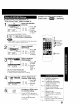


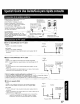


j o display or remove the
overlay.
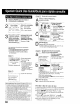
Press DISPLAY.
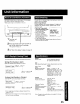
Function Status Channel Caption
Current Time
Rec Time Remaining
(OTR mode only see
page 13.)
REC
-0:25
12:00PM ABC 1
-0:12:34 Counter
sP.
Tape Speed
Time Stamp Data (See page 26, 27.)
Whenever a blank section of a tape
comes up in Play mode, or when the
selected channel has no broadcast
signal with the "Weak Signal Display
ON/OFF' (see page 28) set to "OFF,"
the TV screen will turn solid blue.
When a function button is pressed (PLAY, FF, etc.) or you
change channels, the unit mode or channel number will be
displayed. (Some station names may also appear if Channel
Caption is set. See pages 24, 25.)
08
ABe
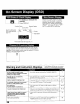
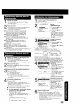
Warning and Instruction Displays Thesedisplayswi!laledyouotemissedoperation or provide further instructions
NO CH FOUND PLEASE CHECK
ANTENNA CABLE CONNECTION THEN
PUSH CH UP KEY AGAIN
PLEASE SET CLOCK BEFORE
PROGRAMMING
CHECK CASSETTE RECORD TAB
TO CANCEL TIMER REC HOLD DOWN
STOP KEY FOR APPROX 3 SEC
NO CASSETTE
PLEASE INSERT A CASSETrE
PLEASE PREPARE FOR TIMER REC
VIDEO HEADS MAY NEED CLEANING
PLEASE INSERT HEAD CLEANING
CASSETrE OR REFER TO MANUAL
END: PLAY KEY
VCR LOCK ACTIVATED
• If no active channels are found for CHANNEL MEMORY,.
• If you attempt to set or review a Timer Recording or set the
On-Timer and the Clock is not set.
• If you press REC, and a cassette is inserted with no record tab..
• If you press STOP during a Timer Recording
• If you press PLAY, FF, REW, or REC without a cassette
inserted...
• If the unit is not in Stop mode or a cassette with record tab is not
inserted two minutes before a Timer Recording is about to begin.
• If head cleaning becomes necessary while playing back a
tape.
• If you press a function button other than STOP/EJECT or
POWER while the unit is in VCR Lock mode..
8,9,34
6,13
15
12, 13
14, 15
35
28
36