
Operating instructions
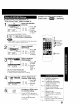


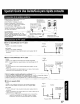


If LOCK menu is not displayed, do
"Enter Secret Code" steps on page 30.
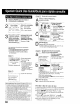
Process of V-Chip Control Feature
Enter Code_ Blocking I
/ LOCK Select US TV
us MOVIES :OFF PROGRAMS STATUS.
CHANGESETTINGS 1) Press &V
NEXTPAGE[F(_ _ to select,
SELECT:A • KEY _ = + ._ A i
SET :1_ KEY i ;6 "_6 i 2) Press • to
END :ACTIONKEY set "ON" or
"OFF."
If you select US TV PRQGRAMS STATUS:
• "ON" --) V-Chip Control is activated.
• "OFF" ---)V-Chip Control is deactivated.
O
• "NEXT PAGE" is setup to CANADIAN V-Chip setting mode.
"NEXT PAGE" cannot be used in the U.S.
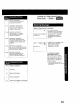
LOCK E1 Select CHANGE
us_OVIES ;OFF SETTINGS.
CHANGE SL_Q'I NGS
US TV PROGRAMS :OFF -- _ 1) Press A.T
_PAG [[_ r_) i to select.
[GELEST:VKEY j ',* :"
SET :_ KEY C_ "_6 2) Press• to
END :ACTION KEY i -- __ display.
PROGRAMS?
_;pGG v S L O _ - 1)PressAT
__/TV:14 W S LLO !:_;_:_+[_C::__;2) tOpressSelect.•to
t END ;ACTION KEY J I i set "YES" or
"NO."
NR (Not Rated) PROGRAMS
Some TV shows, such as news, sports, weather,
bulletins, emergency information usually have no ratings.
4/ •
TV-Y7 FV
TV=G
TV PG V S L D
TV-14 V S L D
TV-MA
SELECT:& • SET: _*
END :ACTION KEY
O
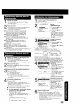
You may select from standard TV
ratings (chart 1), or customize to a
specific content rating (chart 2 )
Select ratings to be
blocked. (See nextpage.)
! 1) Repeatedly
r(:_ r_) Press &V
t _: toseect.
I 2) Press •
to set,
• Ratings which
are highlighted
in Green will be
blocked, when
not highlighted
(white letters),
these will not be
blocked.
32
ACTION
CD
Exit this mode.
Press ACTION four times.
1
SELECT/SET
3A:CH UP
V:CHDOWN
4_:VOLUP