
Operating instructions
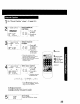

V-Chip Control Feature is...
The unit has built-in V-Chip Control which allows you to
block unwanted TV usage based on US MOVIES and
US TV PROGRAMS ratings.
Process of V-Chip Control Feature
A 4-digit code must be entered to view a blocked program or
change rating settings.
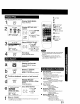
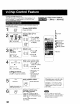
1 _N Display MAIN MENU,
Press ACTION.
SELECT:A _ • KEY
:ACTION KEY /
Display SET UP TV
screen.
._. 1) Press AV< •
to select "TV."
!_ "_::_ 2) Press ACTION
ACTION to display.
{Cg_t,oNSETuPw
/ INPUT SELECT :TUNER
VIDEO ADJUST
SELECT:& • KEY
SET :. KEY
END :ACTION KEY
Select Lock,
1) Press AV
r.vo_ Fc_
,o _c:_ to select.
,cD*-!6 2) Press•
to display.
1
2ACTION
SELECT/SET
UP
3V :CH DOWN
• :VOL UP
4<:VOL DOWN
"ADD/DLT
4
LOCK
ENTER 4-DIGIT CeDE
SELECT:A • KEY
END :ACTION KEY
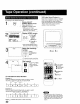
Enter your secret code.
1) Press AV to
F vol F(_
,o - select a number.
,o -_6 2) Press•
( or • ) to set.
To Make Corrections
Press <IP" to move the cursor
and AV to make the correction.
• Repeat step 4 until
air 4-digits are
entered,
• Take care that you
are not observed
entering the
secret code
5
LOCK El
RECOGNIZED
CHANGE CODE:ADO/DLT K
CONTINUE:ACTION KEY
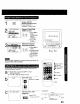
Save 4-DIGIT CODE.
Press ACTION.
ACTION
CD
3O
Display LOCK menu
for rating screen.
Press ACTION and go to
page 31 (us MOVIESRatings),or
page 32 (us TVPROGRAMSRatings)
Or,
to exit, press ACTION
four times.
Changing your secret code
• You will need your current code
Do steps 1-4. In step 5, press
ADD/DLT to clear current code.
Repeat steps 4 and 5 to enter
new code.
O
• DO NOT forget your secret code.
• Once rating are set, restricted tapes or
programs cannot be accessed unless
the secret code is entered.