
Operating instructions
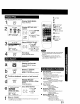
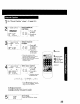
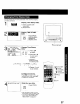
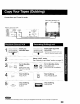

Connections you'll need to make.
Recording (Editing) unit
Playing (Source) VCR
AUDIO VIDEO
OUT
IN FROM
@ ANT.
@ OUT TO
TV
1
Insert pre-
recorded tape.
t1"
m
_- i Insert blank tape with
_ recordtab.
• Dubbing tapes protected with Copy
! t I Guard will have poor quality results•
2
Select "LINE" mode.
See "Selecting Input Mode" section on page 13.
3I [p_Ay____ pA[_USFC Put in standbymode.
Press PLAY then
; _ , PAUSE at starting
point.
I Put in Standby mode.
PAUSE
' O Press REC, then
i PAUSE/SLOW immediately•
SLOW I
I
I
Start dubbing.
Press PLAY.
PAUSE Start dubbing.
Press PAUSE/SLOW.
SLOW
I
L_
! _ Stop dubbing.
._._:o_, ! Press STOP/
_ EJECT.
1
[
L_
i Stop dubbing.
i Press STOP.
• Unauthorized exchanging and/or copying of copyrighted recordings may be copyright infringement.
29