
Operating instructions
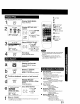
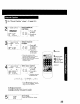
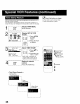
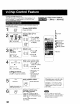

Go directly to the desired recording.
r S_ARCI_ / Display SELECT
SEARCH MODE screen.
1 CD
[ Press SEARCH in
Playback or Stop mode.
• If there are no Timer
Recordings on the Program
Index List, go to step 3.
2
SELECTSEARCHMODE
ZERO SEARCH
,,_==--_=,' II
PROGRAMEND SF..,_£,H
PROGRAM INDEX SE_I_CH
SELECT:A• KEY
SEt :1_ KL?t
END : SEARCH KEY
Display INDEX screen.
-- " i 1)PressAT
FVO_ F¢_
,¢_ _9 to select
_ _ "INDEX
,cc, -_ I SEARCH."
2) Press • to
display.
• This screen appears only if
there are Timer Recordings.
INDEX
Select the recording
number.
66c5] Press
c566 i NUMBERED
6 cbc5 keys.
6
• To calculate number, see below
VHS Index Search System is ...
Each time recording is made, an invisible
index mark is placed on the tape. When
timer recordings are made, program
index and information are also included.
These index marks can be used to
access or scan recordings.
I Iiiiiiiiii/]iii]iiiii]it]ii
4REW4FF
INDEX ___
D 04
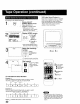
Start search.
Press FF or SEW.
• When search is
finished,playback
begins.
or
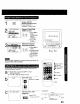
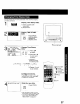
To calculate the Index Number
Example 1:
If you are watching recording 4 and you want to watch
recording 2, enter 3 in step "3" and press SEW.
1,1, J, 1,1 °
171
2SELECT/SET
A:CH UP
V:CH DOWN
:VOL UP
NUMBERED
Keys
1 SEARCH
"4FF orREW
Example 2:
If you are watching recording 2 and you want to watch
recording 6, enter 4 in step "3" and press EF.
0
NOTE: ,_indicates start points of each recording.
22
• Make each entry within 10 seconds, or
the Index Search mode will be canceled.
• If these VHS Index Search Systems are
started very ctose to an index mark, that
index mark may not be counted in the
search.