
Operating instructions

i,
ACTION
CD
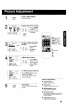
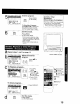
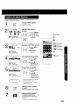
Display MAIN MENU.
Press ACTION.
3
MAIN MENU
CH CLC(_ EXIT 1
J
S_CT:A • • • KEY
SET :ACTION KEY
Display SET UP TV screen.
1) Press ,LV_ Ib"
_':' _ to select "TV."
I _'c:_!(D Press ACTION
2)
to display.
ACTION
0
SET UP TM
LOCK
CAPTION
:TUNER
SELECT:A • KEY
SET :" KEY
END :ACTION KEY
Display VIDEO ADJUST
screen.
I _ _ 1) Press Ay to
r,_ _:_ select.
"_,C:3-*!_:3 , 2) Press I_ to
, display.
....... i......
TINT ....... t......
BRIGHTNESS ....... I......
PICTURE ..............
SHARPNESS ....... I......
NORMAL
SELECT:& • KEY
ADJUST:_ • KEY
ENO :ACTION KEY
COLOR ....... t......
T_NT ....... t......
BRIGHTNESS ....... I......
PICTURE .............. 4
SHARPNESS ....... I......
SELECT:A • KEY
:" KEY
END :ACTION KEY
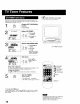
Adjust desired item.
1) Press &V to
rC M
_9 select an item.
,_ -=6 (See below right.)
2) Press • I_ to
adjust.
3A:CH UP
V:CH DOWN
41_ :VOL UP
"_ :VOL DOWN
ACTION
5
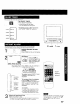
To Reset Picture Controls.
Press AV and I_ to select
and set "NORMAL."
All controls return to their
factory settings.
ACTION
CD
End setup.
Press ACTION three times
to exit.
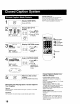
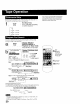
Picture Adjustment
• COLOR Control
Adjust color intensity.
• TINT Control
Adjust for natural flesh tones.
• BRIGHTNESS Control
Adjust picture brightness.
PICTURE Control
Adjust picture intensity by adjusting
both contrast and color level in the
proper balance.
• SHARPNESS Control
Adjust picture sharpness.
11