
Operating instructions
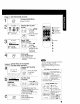

Press POWER on
the remote or unit.
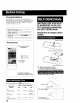
[_lPcheck list before you begin.
[] All connections are made. (See page 7.)
Your unit is plugged in.
O8
ASC
I 24 III!fllllll ......................
Select a channel.
Ec_ Using CH &V or
; NUMBERED
or keys.
c5&6
6cb6
_cb
Adjust volume.
[ VOL Press VOL + -.
,O
=_+
PLAY/
REPEAT
i 1
1 2 PHONES
Jack
• Using the 100 key
When selecting CABLE channels 100 to 125 with the
NUMBERED keys, first press the 100 key, and then enter the
remaining two digits.
• Rapid Tune
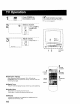
Press R-TUNE to display the last channel you were watching.
POWER
UP/DOWN
MUTE UP/DOWN
RAPID NUMBERED
TUNE Keys
10OKEY
• Audio Mute
Press MUTE to instantlymute the sound.
Press again, to restore the previous sound level.
• Phones
Connect an earphone (not supplied) or headphones (not
supplied) to the Phones Jack.
10