
Installation Instructions





EN-28
Editing Your Photos
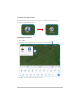
1. From the Home screen, tap Files ( ).
2. Select the photo you want to edit.
3. Tap
. Then you can do the following:
Option Description
$XWR¿[
)
Automatically adjusts the brightness and
contrast levels.
Crop (
)
&URSV\RXUSKRWRWRDGLႇHUHQWVL]H
Resize ( )
Resizes your photo.
Brightness & Contrast (
)
Adjusts the brightness and contrast levels
manually.
Rotate left (
)
Rotates the photo 90-degree counter-
clockwise.
Rotate right (
)
Rotates the photo 90-degree clockwise.
Undo ( )
Cancels the last change.
Redo (
)
Reverts the last undo.
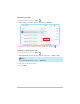
Note
Tap
> EXITWRH[LWWKHHGLWLQJPRGH