
Installation Instructions





EN-26
Managing Files
Browsing the Files
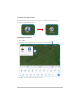
1. From the Home screen, tap Files ( ).
2. 2QWKHOHIWSDQHOEURZVHWKH¿OHRUIROGHU\RXZDQWWRYLHZ
File
Categories
7DSWRVHDUFKWKH¿OH
Tap to switch the view mode.
7DSWRVRUWWKH¿OHVIROGHUV
Tap to access more options.
Internal Memory
Google Drive
External Storage Device
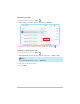
3. 7DSWKHGHVLUHG¿OHWRRSHQLW
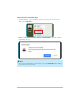
IMPORTANT!
Make sure to tap to unmount the memory card properly before
removing it from your tablet.