
Installation Instructions





EN-24
Pin an App to the Shelf
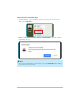
Tap and hold the app icon until the pop-up menu appears on the screen. Then
select Pin to shelf.
When you pin an app to the shelf, the app will remain there until you remove it.
Tip
To change the apps icons arrangement on the shelf, just drag them
around.
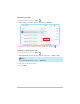
To unpin the app from the shelf, tap and hold the app icon until the pop-out
menu appears. Then tap Unpin.