
Installation Instructions





EN-23
Removing the Installed App
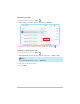
1. Tap and hold the app icon until the pop-up menu appears on the screen.
Then select Uninstall.
2. :KHQDFRQ¿UPDWLRQPHVVDJHDSSHDUVWDSUninstall to continue with the
uninstalling the app.
Note
You cannot uninstall all the preinstalled apps. The Uninstall option will not
appear in the pop-out menu.