
User's Manual
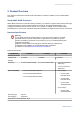


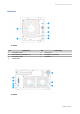
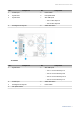
Table Of Contents

Component TL-D400S TL-D800S TL-D1600S
SFF ports 1 x SFF-8088 (drive bays
1-4)
2 x SFF-8088
• Port 1: Drive bays 1-4
• Port 2: Drive bays 5-8
4 x SFF-8088
• Port 1: 3.5-inch drive
bays 1-4
• Port 2: 3.5-inch drive
bays 5-8
• Port 3: 3.5-inch drive
bays 9-12
• Port 4: 2.5-inch drive
bays 1-4
Important
• Each SFF-8088 port supports four SATA 6 Gb/s lanes.
• These ports are only for connecting the host bus adapter to a
JBOD enclosure.
Interface
Switches • Power
Important
QNAP recommends waiting at least two seconds after powering
off the JBOD enclosure before powering it on again.
• Fan speed
• Audio alert
Dimensions
Form factor Tower
Dimensions (H x W
x D)
168.5 x 160.2 x 219.0 mm
(6.63 x 6.31 x 8.62 in)
188.2 x 329.3 x 279.6 mm
(7.41 x 12.96 x 11.01 in)
303.8 x 369.9 x 319.8 mm
11.96 x 14.56 x 12.59 in
Net weight 3.66 kg (8.06 lbs) 6.17 kg (13.6 lbs) 11.59 kg (25.5 lbs)
Other
Power supply unit 65W, 100-240V AC, 50/60
Hz
250W, 100-240V AC, 50/60
Hz
250W, 100-240V AC, 50/60
Hz
Warning
To reduce the risk of fire or electric shock, ensure that you only
connect the power cord to a properly grounded electrical outlet.
Sound level 19.7 db(A) 21 db(A) 25 db(A)
Note
The sound level was tested at a bystander position, which is within
one meter of the JBOD enclosure. The test device operated at low
speed with the maximum number of drives installed.
Fans System: 1 x 12 cm, 12V
DC smart fan
System: 2 x 12 cm, 12V
DC smart fans
System: 3 x 9.2 cm, 12V
DC smart fans
Warning
To avoid potential injury or damage to the components, do not
touch the fans while the device is connected to a power source.
QNAP JBOD Enclosure User Guide
Product Overview 4