User's Manual
Manuals
Brands
QNAP Manuals
Computers
TL-D1600S 16-Bay JBOD Enclosure
21
22
23
24
25
26
27
28
29
30
Table Of Contents
Contents
1. Preface
About This Guide
Audience
Document Conventions
2. Product Overview
About QNAP JBOD Enclosures
Hardware Specifications
Package Contents
Components
Front Panel
Rear Panel
Drive Numbering
Safety Information
Installation Requirements
Setting Up the JBOD Enclosure
3. Hardware Installation
Drive Installation
Installing 3.5-inch Drives on 3.5-inch Trays
Installing 2.5-inch Drives on 3.5-inch Trays
Installing Solid-State Drives on Solid-State Drive Trays
Connecting the JBOD Enclosure to a NAS
Connecting the JBOD Enclosure to a Computer
4. Basic Operations
LCD Panel
LEDs
Audio Alert
Fan Speed Switch
5. Troubleshooting
Forcing Storage & Snapshots or QNAP JBOD Manager to Recognize the JBOD Enclosure
Hot-Swapping Failed Drives
Support and Other Resources
6. Glossary
QTS
QNAP JBOD Manager
Storage & Snapshots
7. Notices
Limited Warranty
Disclaimer
GNU Public License
FCC Notice
CE Notice
SJ/T 11364-2006
VCCI Notice
BSMI Notice
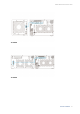
TL-D400S
TL-D800S
QNAP JBOD Enclosure User Guide
Hardware Installation
24
1
...
...
23
24
25
26
27
...
...
46