Magellan® 2200VS/2200VSΩ Quick Reference Guide
PSC Inc 959 Terry Street Eugene, Oregon 97402 Telephone: (541) 683-5700 Fax: (541) 345-7140 An Unpublished Work - All rights reserved. No part of the contents of this documentation or the procedures described therein may be reproduced or transmitted in any form or by any means without prior written permission of PSC Inc. or its wholly owned subsidiaries ("PSC").
PSC INC. MAGELLAN® END USER LICENSE AGREEMENT Notice to End User: The PSC Product you have acquired contains embedded Software, which is integral to the product’s operation. This Software is being provided to you under license, subject to the terms and conditions of this Agreement. If you use the PSC Product, you will be deemed to have accepted the terms and conditions of this Agreement.
6.2 uct, uses the product in any manner other than as established in the Documentation, or if End User breaches any of the provisions of this Agreement. EXCEPT AS PROVIDED IN THIS AGREEMENT, THE PSC PRODUCT IS PROVIDED “AS IS” AND PSC MAKES NO WARRANTIES OF ANY KIND, EXPRESS OR IMPLIED, WRITTEN OR ORAL, WITH RESPECT TO THE PRODUCT, AND SPECIFICALLY DISCLAIMS THE IMPLIED WARRANTIES OF MERCHANTABILITY AND FITNESS FOR A PARTICULAR PURPOSE. 7. Infringement. 7.1 7.2 7.3 7.
CONTENTS English .................................................................................1 Français ...............................................................................5 Deutsch ...............................................................................9 Italiano ..............................................................................13 Español ..............................................................................17 Portugues ............................................
iv Magellan® 2200VS/2200VSΩ
Quick Reference Guide Introduction This guide offers a summary of basic scanner operation for first time users. Installers, system managers and other technical personnel can find installation, programming and further advanced information in the Product Reference Guide. Up-todate revisions of publications can be viewed, printed and downloaded from the PSC website listed on the back cover of this manual. Printed manuals can also be ordered from your dealer/distributor.
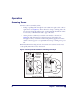
Operation Scanning Items Item bar codes are scanned by either... • • sliding or pushing items through the scan volume in a right-to-left or left-toright motion (see Figure 2a). This is known as “Sweep” scanning, and is the best choice for high throughput super- and hypermarket installations where it is necessary to minimize the need to grip or lift items. moving the bar code directly toward the scan window to be read (see Figure 2b).
Volume/Tone Push Button The Volume/Tone Push Button also performs multiple functions depending upon the duration of time it is pressed: NOTE Volume changes made using the Volume/Tone Push Button are lost when the scanner is powered-down and are reset to the configured setting. If you wish to permanently change the volume, use the special programming labels in the Product Reference Guide. Table 1-1.
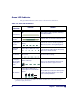
Green LED Indicator The green LED indicates scanner status as shown in the table below.. Table 1-2.
Introduction Ce guide présente une synthèse du fonctionnement de base du scanner à l'attention des utilisateurs novices. Les installateurs, les administrateurs de système et autres personnels techniques pourront obtenir des informations sur l'installation, la programmation ainsi que d'autres indications plus avancées dans le Guide de référence du produit.
Fonctionnement Lecture d’articles Les codes à barres des articles sont numérisés selon deux procédures soit… • en faisant glisser ou en poussant les articles à travers le volume de lecture de la droite vers la gauche ou de la gauche vers la droite (voir Figure 4a). Il s'agit du mode de lecture " Transfert " (par balayage) qui constitue la meilleure solution pour la moyenne et la grande distribution, où il faut limiter au maximum la saisie ou le soulèvement des articles.
Bouton-poussoir volume/tonalité Le bouton-poussoir volume/tonalité exécute également des fonctions multiples selon la durée de son activation : NOTA Les changements de volume rendent l'utilisation du Bouton de réglage du Volume/Tonalité difficile lorsque le scanner est hors tension et est réinitiliasé au paramètre configuré. Si vous désirez changer définitivement le volume, utilisez les étiquettes spéciales de programmation dans le Guide de référence du produit. Tableau 5.
Fonctions des voyant DEL Vert Le voyant DEL vert (Figure 4d) indique l'état du scanner au Tableau 6 ci-dessous. Tableau 6.
Einleitung Diese Anleitung bietet eine Zusammenfassung der grundlegenden Scanner-Bedienung für neue Benutzer. Systemmanager, Installations- und anderes technisches Personal finden Informationen zu Installation, Programmierung und weitere Angaben im Produktreferenzhandbuch. Aktuelle Änderungen der Publikationen finden Sie auf der PSC-Homepage; diese können Sie drucken und herunterladen. Die Internet-Adresse finden Sie auf der Rückseite dieses Handbuchs.
Bedienung Scannen von Produkten Artikel-Barcodes werden gescannt entweder durch... • Schieben der Artikel durch den Scanbereich von rechts nach links oder von links nach rechts (siehe Abbildung 8a). Dieses Verfahren ist als "Sweep"Scannen bekannt und die beste Methode für Super- und Hypermärkte mit hohem Warendurchsatz, bei denen eine Minimierung von Greif- und Hebebewegungen notwendig ist. • Plazieren des Barcode direkt vor das Scanfenster, damit er eingelesen werden kann (siehe Abbildung 8b).
Lautstärke/Tonschalter BEACHTEN SIE Änderungen der Lautstärke, die über die Drucktaste "Volume/Tone" erfolgt sind, werden beim Herunterfahren des Scanners gelöscht, und es erfolgt ein Zurücksetzen auf die Werkseinstellungen. Eine dauerhafte Änderung der Lautstärke kann mit Hilfe der speziellen Programmierkenndaten im Produktreferenzhandbuch vorgenommen werden. Tabelle 3-1.
Grüne LED Funktionen Tabelle 3-2. Grüne LED Funktionen LED Anzeige Scanner ist aktiva Dauer Die Grüne Anzeige ist dauerhaft an und leuchtet schwach (Normalmodus) Optisches Signal, das erfolgreiches Scannen anzeigta Programmiermodusanzeige Bereitschaftsmodusanzeige Host außer Betrieb Hardwarefehlerwarnung (Fehlermodus) HardwarefehlerAnzeige (FehlerModus) Grüne Anzeige - helles Aufblinken Grüne Anzeige - wiederholtes Blinken Die grüne LED-Anzeige blinkt im 2Sekunden-Takt.
Introduzione Questa guida offre un sommario delle operazioni principali dello scanner per utenti inesperti. Installatori, amministratori di sistema e altro personale tecnico possono trovare informazioni sull'installazione, programmazione ed altre questioni avanzate nella guida di riferimento del prodotto. Revisioni aggiornate delle pubblicazioni possono essere visualizzate, stampate e scaricate dal sito web PSC indicato sulla copertina posteriore di questo manuale.
Funzionamento Utilizzo dello scanner i codici a barre dell'articolo sono scansiti con uno dei metodi seguenti ... • facendo scorrere o spingendo gli articoli attraverso il volume di scansione con un movimento da destra a sinistra o da sinistra a destra (vedere Figura 10a). Si tratta della scansione a scorrimento ed è la scelta migliore per installazioni in supermercati e ipermercati a traffico elevato, dove è necessario minimizzare la necessità di afferrare o sollevare gli articoli.
Tasto tono/volume Il tasto tono/volume svolge molteplici funzioni in base alla durata della pressione esercitata: NOTA Le variazioni di volume effettuate con l'interruttore a pulsante Volume/ Tono sono annullate con lo spegnimento dello scanner e quindi impostate nuovamente nel modo predefinito. Se si vuole modificare permanentemente il volume, utilizzare le speciali etichette di programmazione illustrate nella guida di riferimento del prodotto. Tabella 4-1.
LED Verde Tabella 4-2. Funzioni dei LED verde SIGNIFICATO DURATA NOTA Scanner attivoaa LED verde acceso (intensità media) Lo scanner è pronto per l'utilizzo. Funzione di scansione immediatamente disponibile. LED verde acceso (intensità max) Segnala l'avvenuta lettura e decodifica di un codice a barre.
Introducción Esta guía presenta un resumen de la operación básica del escáner para quienes lo utilizan por primera vez. Los instaladores, administradores de sistema y demás personal técnico pueden consultar la Guía de referencia del producto para obtener detalles de instalación, programación y otra información avanzada. El sitio web de PSC, cuya dirección figura en la contratapa de este manual, contiene diferentes publicaciones actualizadas al momento, que se pueden ver, imprimir y descargar.
Funcionamiento Escaneo de objetos Los códigos de barra de las mercancías se pueden escanear... • deslizando o pasando las mercancías por el campo de lectura con un movimiento de derecha a izquierda o de izquierda a derecha (ver Figura 12a). Esto se conoce como "lectura de pasada", y constituye la mejor opción para las instalaciones de supermercados e hipermercados porque permite obtener rapidez en la operación de lectura y minimiza la necesidad de tener que asir o levantar los productos.
Botón pulsador Tono/Volumen NOTA Los cambios realizados en el volumen mediante el botón pulsador para Volumen / Tono se pierden cuando se apaga el escáner y, cuando se lo vuelve a encender, se recuperan los valores preestablecidos. Si usted desea modificar el volumen de modo permanente, emplee las etiquetas de programación especial que figuran en la Guía de referencia del producto. Tabla 5-1.
Funciones de el indicador luminoso verde Tabla 5-2.
Introdução Esta guia oferece um sumário de operações básicas do leitor para principiantes.O Instalador, administradores de sistema e outro pessoal técnico podem encontar programação, instalação, e informações avançadas adicionais no Guia de Referência do Produto. Revisões atualizadas das publicações podem ser visualizadas, impressas e baixadas (download) do website da PSC, que está escrito atrás da capa deste manual. Manuais impressos podem também ser requisitados ao seu revendedor/distribuidor.
Operação Para usar seu leitor Os códigos de barras nos artigos podem ser lidos por meio de... • deslizar ou empurrar artigos pelo volume de leitura em um movimento da direita para a esquerda ou da esquerda para a direita (veja Figura 14a). Isto é conhecido como leitura por "Varredura", e é a melhor escolha para um alto escoamento nas instalações de super- e hipermercados, onde é necessário minimizar a necessidade de pegar ou levantar artigos.
Botão de Volume / Tonalidade O Botão de Volume / Tonalidade também executa multíplas funções, dependendo da duração que o mesmo foi pressionado: Observação As mudanças de intensidade feitas usando o Botão de Volume/Tonalidade são perdidas quando o leitor é desligado e volta para configuração de instalação. Se você deseja mudar o volume de forma permanente, use as etiquetas de programação da Guia de Referência do Produto. Tabella 6-1.
Funções do LED Verde Tabella 6-2. Funções do LED Verde INDICAÇÃO Leitor Ativoa DURAÇÃO LED Verde aceso e meio-aceso O leitor está pronto para ser operado. Leitura está disponível de imediato. LED Verde - piscando forte Indica a leitura de um código de barras e sua decodificação.
简介 该指南向第一次使用扫描器的用户概要介绍扫描器的基本操作。安装人 员、系统管理员和其他技术人员可以在 《产品参考手册》中找到有关安 装、编程和更高级的信息。此手册以及该产品的其他手册在随扫描器所 带的手册 CD 中都有。有关这些出版物的最新修改可以从 PSC 网站上浏 览、打印和下载,该网址在本手册的封底上可以找到。您还可以从经销 商 / 分销商那里订购印刷好的手册。 连接 为了方便您了解,图 1 中介绍了扫描器连接及各部分的功能。 图 1.
操作 扫描单品 单品条码的扫描方式有两种 ... • 将单品自左向右或自右向左滑过或推过扫描区 ( 见图 2 a)。这是 “扫过”式扫描,特别适用于超级市场,因为在超级市场应当尽可 能减少抓拿和搬动商品的机会。 • 将条码直接对准扫描窗 ( 见图 2b)。这种 “呈现”式扫描技术常用 在杂货店、便利店和药店里,因为在这些地方可用的柜台空间非常 珍贵,不可能采纳 “扫过”式扫描。 由于采纳了 FirstStrikeTM 解码软件,扫描器可以快速读取最难读取的条 码,且不需要更多调整物品方位。 图 2.
音量 / 音调按钮 根据按下按钮时间的不同,音量 / 音调按钮也有多项功能: 当将扫描器关机后,使用音量 / 音调按钮对音量所作的修改会丢 失,并恢复到原来设定的状态。如果您想永久性地改变音量,请 使用 《产品指南》中的特殊编程标签。 注意 表 1-1.
绿色指示灯 绿色指示灯所表示的扫描器状态如下表所列: 表 1-2. 绿色指示灯指示 表示内容 扫描器处于活 动状态a ( 正常模式 ) 读取正确 a 编程模式 休眠模式 主机禁用 现场可换部件 (FRU) 警告 ( 故 障模式 ) 持续时间 扫描器绿色指示灯连续发光且 灯光暗淡 扫描器绿色指示灯亮闪一次 扫描器绿色指示灯连续闪烁 绿色指示灯每两秒闪烁一次 扫描器指示灯 1 秒钟关, 1/10 秒亮 发出低音调声响 1 秒钟。指示 灯连续闪烁。 扫描器绿色指示灯连续闪烁, 与扬声器的报警声交替回应。 FRU 指示 注解 扫描器准备就绪,可以随时工作。 表明条码已被读取和解码。 表明扫描器处在标签编程模式。关机后 再开机可以退出该模式。 由于长时间闲置,扫描器马达和 / 或激 光器已经自动关闭,系统进入休眠模 式。 主机禁止扫描。 表示发现致命的 FRU 故障。请给系统 支持人员打电话寻求帮助。 只有当按下音量 / 音调按钮后出现 FRU 警告时才会出现。请维修技术人员查找 FRU 故障。 a.
Appendix A. Product Labeling IEC CLASS 1 LASER PRODUCT Class IIa Laser Product. Avoid long term viewing of direct laser light. Appareil á laser de classe IIa. Eviter toute exposition prolongée de la vue à lumière laser directe. 6-1018 PSC Inc. 959 Terry Street Eugene, OR 97402 USA XXXXXXXXXXXX Product of USA This device complies with Part 15 of the FCC Rules.
Appendix B — Productivity Index Reporting Option Productivity Index Reporting™ Option. Your scanner may be equipped with the optional Productivity Index Reporting™ feature. This feature allows for data collection on the readability index of bar codes scanned by the scanner. This data may be transmitted to the POS Terminal where it may be easily sorted for action by the MIS department to improve bar code quality at the front end.
Opcion de Productivity Index Reporting. Su escaner puede ser epuipado con el opcional Indice de Productivity Index Reporting™. Esta funcion permite colectar datos en el indice de la lectura de los codigos de barras por el escaner. Estos datos pueden ser transmitidos a la Terminal POS donde puede ser facilmente clasificado por el departamento de MIS para meforar la calidad de el codigo de barra en la parte frontera.
Appendix C. Laser Safety International Caution Statements Class I English This scanner is certified in the U.S. to conform to the requirements of DHHS/CDRH 21CFR Subchapter J and to the requirements of IEC 825-1:2001. Class I and Class IIa products are not considered to be hazardous. The scanner contains internally a Visible Laser Diode (VLD) whose emissions do not exceed the maximum limits as set forth in the above regulations.
ATTENZIONE • • • Danish l’uso di comandi o di procedure diversi da quelli specificati in questa sede possono causare l’esposizione ad una luce laser pericolosa. evitare di tentare di aprire o riparare dei componenti nella cavità ottica. L’apertura o la riparazione della cavità ottica da parte di persone non autorizzate può essere in violazione dei regolamenti di sicurezza relativi all’impiego di raggi laser. Il sistema ottico può essere riparato soltanto in fabbrica.
Finnish Tämä tutkain on hyväksytty Yhdysvalloissa vastaamaan DHHS/CDRH 21CFR Subchapter J luokka II ja 825-1:2001 IEC-vaatimuksia. Luokka I tai Luokka II tuotteiden ei katsota olevan vaarallisia. Tutkain sisältää sisäisen näkyvän laserdiodin (Visible Laser Diode (VLD), jonka päästöt eivät ylitä yllä olevien säädösten asettamia maksimirajoja.
Chinese Japanese Quick Reference Guide 35
Hebrew 36 Magellan® 2200VS/2200VSΩ
NOTES Quick Reference Guide 37
Appendix D. Warranty Warranty PSC warrants to Customer that PSC's products will be free from defects in materials and workmanship for a period of 1 year from product shipment. In order to obtain service under this Warranty, Customer must notify PSC of the claimed defect before the expiration of the Warranty period and obtain from PSC a return authorization number for return of the product to designated PSC service center.
Quick Reference Guide 39
NOTES 40 Magellan® 2200VS/2200VSΩ
DECLARATION OF CONFORMITY PSC hereby declares that the Equipment specified below has been tested and found compliant to the following Directives and Standards: Directives: EMC 89/336/EEC Low Voltage 73/23/EEC Standards: EN55022-13:1998 Generic Emissions EN60950:2000 ITE Safety EN55024:1998 Generic Immunity-ITE CISPR 22-B:1997 Generic Emissions EN60825-1:2001 Laser Safety Equipment Type: Product: Barcode Scanning Equipment Magellan® 2200VS Brad West Vice President Quality and Process Management PSC, I
Asia Pacific Italy PSC Hong Kong Hong Kong Telephone: [852]-2-584-6210 Fax: [852]-2-521-0291 PSC S.p.A. Vimercate (MI), Italy Telephone: [39] (0) 39/62903.1 Fax: [39] (0) 39/6859496 Australia Japan PSC Asia Pacific Pty Ltd. North Ryde, Australia Telephone: [61] 0 (2) 9878 8999 Fax: [61] 0 (2) 9878 8688 PSC Japan K.K. Shinagawa-ku, Tokyo, Japan Telephone: 81 (0)3 3491 6761 Fax: 81 (0)3 3491 6656 France Latin America PSC S.A.R.L. LES ULIS Cedex, France Telephone: [33].01.64.86.71.00 Fax: [33].01.