
User`s guide






27
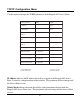
TCP/IP Configuration Menu
Use this option to change the TCP/IP parameters of the RangeLAN2 Access Point.
emaNretemaraPegnaRtluafeD
sserddAPI- 0.0.0.0
ksaMtenbuS- 0.0.0.0
yawetaGtluafeD
sserddA
-0.0.0.0
tooBtaPTOOBdneS
emiT
eslaF/eurTeurT
revreSPTOOB
sserddA
-*0.0.0.0
sseccAtenleTdelbasiD/delbanEdelbanE
drowssaPtenleTsretcarahc01-
tnemeganaMresworB^delbasiD/delbanEdelbanE
emaNresUresworB^sretcarahc01-
drowssaPresworB^sretcarahc01-
x2572NALegnaR^
ylnotnioPsseccA
otdesusi0.0.0.0*
tsacdaorbadnes
IP Address indicates the IP address that will be assigned to the RangeLAN2 Access
Point. It must be a unique number on the network. This parameter will not change until
the Access Point is reset.
Subnet Mask indicates the mask that will be used to determine what network the
RangeLAN2 Access Point is on. This parameter will not change until the Access Point
is reset.