
Instruction Manual



2
Part Names and Functions
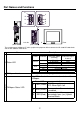
Name Description
AStatus LED
B
CANopen Interface Dsub 9-pin connector (plug.)
C
D
E
CANopen Status LED
This LED indicates the communication status of the
CANopen.
Left side
(AGP-3500T)
A
Front
B
C
(AGP-3300T)
D
E
D
B
The arrangement of CANopen I/F and its peripheral equipment differs between the GP-3300/GP-3400 Series
and the GP-3500/GP-3600 Series.
E
C
Color Indicator
Operation Mode
(Drawing)
Logic execution
mode (when logic is
enabled)
Green
ON
OFFLINE
-
In operation
RUN
Flashing In operation
STOP
Red
ON When power is turned on.
Flashing In operation
Major Error
Orange
ON Backlight burnout
Flashing During software startup
Status LED Indicates
C PWR (Green)
ON: When applying current,
OFF: When light is off
D RUN (Green)
Turns on when Communication
is enabled.
E ERR (Red)
Turns on when failure occurs in
connected slaves (ex.) Hybrid
Terminal Block.