
Manual




15
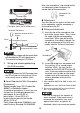
• When using the GP, be sure to attach
all the 2 USB covers.
Removing the USB Holder
(1) Lift up the tab of the USB holder and
then remove the USB cover as shown
below.
(2) After removing the USB cable,
remove the picks pushing the USB
holder from both top and bottom.
Installation prerequisites for
standards
For the detailed certification's
information, refer to the Pro-face Home
page.
<Cautions>
Be aware of the following items when
building the GP into an end-use product:
•
The GP unit’s rear face is not approved as
an enclosure. When building the GP unit
into an end-use product, be sure to use an
enclosure that satisfies standards as the
end-use product’s overall enclosure.
• The GP unit must be used indoors only.
• Install and operate the GP with its front
panel facing outwards.
• If the GP is mounted so as to cool itself
naturally, be sure to install it in a verti-
cal panel. Also, it’s recommended that
the GP should be mounted at least
100mm away from any other adjacent
structures or machine parts. The tem-
perature must be checked on the final
product in which the GP is installed.
• Serial Interface (COM2) is not Limited
Power Source.
• For use on a flat surface of a Type 4X
(Indoor Use Only) and/or Type 13
Enclosure.
For use on a flat surface of a Type 1
Enclosure (AGP3650-U1-D24 only).
Hazardous Locations -
Compliance and Handling Cautions
(1) Power and input/output wiring must
be in accordance with Class I, Divi-
sion 2 wiring methods - Article
501.10(B) of the National Electrical
Code, NFPA 70 within the United
States, and in accordance with Sec-
tion 18-152 of the Canadian Electrical
Code for units installed within Can-
ada.
(2) Suitable for use in Class I, Division 2,
Groups A, B, C, and D Hazardous
Locations, or Non-Hazardous
Locations only.
(3) “WARNING: Explosion hazard-
substitution of any components may
impair suitability for Class I, Division
2”.
(4) WARNING: Explosion hazard-when
in hazardous locations, turn OFF
power before replacing or wiring
modules.
(5) WARNING: Explosion hazard-
confirm that the power supply has
been turned OFF before
disconnecting equipment, or confirm
that the location is not subject to the
risk of explosion.
(6) “WARNING: Explosion hazard-do not
disconnect equipment unless power
has been switched off or the area is
known to be Non-Hazardous”.
(7) In the case of use in Hazardous
Locations, be sure to check that the
externally connected unit and each
interface have been fixed with screws
and locked.
In Hazardous Locations, it’s impossible
USB Holder
Tab
USB Cover
GP-3500/3600 Series GP-3700 Series
Tab