
Owner manual




14
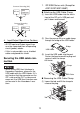
(5) Following the diagram, completely
tighten the tie and thoroughly affix
the clip on the connector shell.
• Attach the GP unit's rear face of the
USB host interface by the same proce-
dure.
Detaching the USB cable
(1) Remove the USB cable while pushing
the grip section of the clip.
• When the clip is removed from the
USB cable, cut the tie making sure not
to damage the cable.
3. GP-3400 Series units
Attaching the USB Holder
(1) Before starting the procedure, orient
the two tabs on both sides of the USB
Holder in the direction of the arrows in
the figure and remove the USB Cover.
(2) Attach the USB holder to the USB
Host Interface part of the main unit.
Hook the lower pick of the USB holder
to the attachment hole of the main
unit and then insert the upper pick as
shown below to fix the USB holder.
(3) Insert the USB cable into the USB
Host Interface.
(4) Attach the USB cover to fix the USB
cable. Insert the USB cover into the
tab of the USB holder.
• When using the GP, be sure to attach
all the 2 USB covers.
Tabs
USB Cable
USB Holder
Tab USB Cover