
Owner manual




13
2. AGP-3310T/3360T units
• Be careful for the edge of the clip not to
cut the fingers.
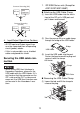
Attaching the USB Cable Clip
(1) Mount the clip to the USB mark
connector shell so that it overlaps.
The clip is corresponding to 27 to
43.5mm [1.06 to 1.71 in.] length of
the USB connector
(2) Align the clip and the USB cable
connector shell, and adjust the
position of the holes where the clip is
affixed. To ensure stability, select the
clip-hole position that is closest to the
base of the connector shell and that
is not making contact with the base.
(3) Following the diagram, pass the tie
through the clip hole. Next, turn the
tie and pass it slightly through the
head, the clip will be lightly affixed on
the USB cable so that the USB cable
can pass through the center of the tie
loop.
• Check the direction of the head before-
hand and make sure that it is in the
position where the USB cable is
through the center of the tie loop so
that the tie can pass through the head.
• Pass the tie through the head lightly
because once it has been tightened it
cannot be loosened again. Tighten
according to Step 5.
• The provided tie can be substituted
with the Pro-face made CA8-
USBATALL-01 or other commercially
available items with width: 2.5 mm
[0.10in.] and thickness: 1.1 mm
[0.04in.].
(4) Insert the USB cable from Step 3 all
the way in to the USB host interface
with pushing the clip tab. Make sure
that the clip tab cannot be removed
from the USB that is hung on the GP.
27 to 43.5mm [1.06 to 1.71 in.]
Pass the tie
through here.
Insert with pushing the clip tab