
Instruction Manual




ST3000 Series Hardware Manual
4-18
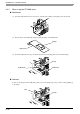
4.4.2 When using the ST-3300 series
Attachment
(1) Insert the USB holder into the slot in front of the ST unit’s USB port and pull it down and forward.
(2) Pass the band of the USB cable clamp through the bridge of the USB holder.
(3) Insert the USB cable into the port. Fasten the band around the plug and secure it with the clamp.
Removal
To remove the clamp from the USB cables, push down on the clamp strap’s clip to release it while pulling up
on the clamp.
1
2
Bridge
USB Holder
Clamp
USB Cable
USB Holder
Clamp
Clip