
Instruction Manual






ST3000 Series Hardware Manual
4-8
When using the AC Type
Power Cord Specifications
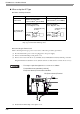
Connecting the Power Cord
When connecting the AC type power cord, be sure to follow the procedures given below.
(1) Be sure that the ST’s power cord is not plugged in to the power supply.
(2) Remove the Terminal Strip’s clear plastic cover.
(3) Remove the screws from the two (2) terminals (L, N) and FG (Frame Ground) terminal, position the
Ring Terminals and reattach the screws. (Check each wire to make sure the connections are correct.)
(4) Reattach the Terminal Strip’s clear plastic cover.
AC Power Cord Grounding Wire
Power Cord
Double-insulated Wire
1.25 to 2.0mm
2
(16-14 AWG)
1.25 to 2.0mm
2
(16-14 AWG)
Recommended
Ring Terminal
*1
*1. In order to prevent a short circuit caused by loose screws, make sure to use a
crimp-type terminal with insulating sleeve.
V2-MS3 compatible
(J.S.T. Mfg. Co., Ltd.)
V2-P4 compatible
(J.S.T. Mfg. Co., Ltd.)
• The torque required to tighten these screws are as follows:
Terminal Block: 0.5 to 0.6N•m [5-7Lb•In.]
FG (Frame Ground) Terminal: 0.6 to 0.7N•m
less than
6.0mm
[0.24in.]
∅3.2mm [0.13in.]
or more
less than
7.0mm
[0.28in.]
∅4.3mm [0.17in.]
or more
FG (Frame Ground) Terminal