
Instruction Manual




Chapter 2 Part Names and Functions
2-7
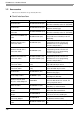
H: DIP Switches
* When the unit turns ON with DIP switch 2 ON, the unit starts in transfer mode. Under normal operating
conditions, set to OFF.
DIP
Switches
Function ON OFF Note
1 Start up from CF Card Enabled Disabled
CF Card with startup
data required
2* Forced transfer mode
Forced Transfer
Mode: ON
Forced Transfer
Mode: OFF
-
3 Reserved - - Constantly OFF
4
Simulate cover closed,
allowing card to be read
even if cover open
Enabled Disabled
Used when CF Card
cover is damaged
1
2
3
4
ON