
Instruction Manual







ST3000 Series Hardware Manual
5-4
5.3 Replacing the Installation Gasket
The installation gasket provides protection against dust and moisture.
Installation Gasket Attachment Procedure
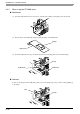
(1) Place the ST on a flat, level surface facing the display face downwards.
(2) Remove the gasket from the ST.
(3) Attach the new gasket to the ST. Be sure to insert the gasket into the ST’s groove so that the gasket’s
groove sides are vertical.
(4) Check that the gasket is attached correctly to the ST.
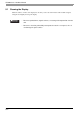
• A gasket which has been used for a long period of time may have scratches or
dirt on it, and could have lost much of its water resistance. Be sure to change the
gasket at least once a year, or when scratches or dirt become visible.
• The ST unit installation gasket’s model number is as follows.
ST-3200 Series ST400-WP01
ST-3300 Series CA3-WPG6-01
ST-3400 Series CA5-WPG8-01
ST-3500 Series CA5-WPG10-01
ST Rear Face
Gasket Seam
Gasket
Installation
Groove