
Bar Code Label Printer User's Manual

Command Language Quick Reference 31
B. COMMAND SET FOR PPLB
The following commands are for Printer Programming
Language B.
All PPLB commands must be ended with <LF> or <CR>+<LF>
codes. No spaces are allowed between parameters and leading
command character.
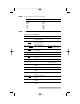
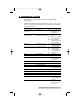
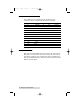
Command Description Parameter
Ax,y,rot,font,hm, Print text. font: 1 ~ 5 for internal
vm,nr,string font and A ~ Z
for soft font.
Bx,y,rot,bar,nw, Print Bar Code. nw: width of narrow
ww,v,hum,string bar: barcode selection bar
ww: width of wide bar
v: bar code height
hum: B for printing
readable code and
N for disabling.
bx,y,type,[] Print 2D Bar Code type: M for Maxi code
and P for PDF 417
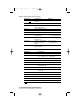
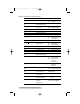
Ccn,dn,just,step,string Counter declaration cn: counter index
dn: digit number
just: L,R,C and N for
field justification
step: step value
Dp1 Heat setting p1: density, 0 ~ 15
EI Print soft font names
Ekstring Delete soft font string:soft font name or
* to delete all
soft fonts
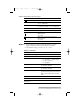
ESstring, . Download soft font
FE End form store
FI Print form names
Fkstring Delete form string:form name or *
to delete all forms
Fsstring Execute form string:form name
Fsstring Save form string:form name
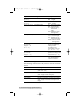
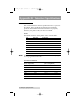
GGx,y,string Print graphics string:graphic name
GI Print graphic list
Gkstring Delete graphics string:graphic name or
* to delete all
graphics
GMstring,size<LF> Store graphics string:graphic name
size: graphic size
in byte
510172_r1.qxd 3/21/2001 6:25 PM Page 31