Synergy TRU-Balance BASIC OPERATION INSTRUCTIONS PoRemote Plus Controller Remote Plus Controller TM ACN# 088 609 661 ACN# 088 609 661
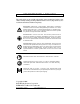
Basic Operation Instructions INFORMATION LABELING The symbols below are used throughout this owner's manual and on the power chair to identify warnings and important information. It is very important for you to read them and understand them completely. WARNING! Indicates a potentially hazardous condition/ situation. Failure to follow designated procedures can cause either personal injury, component damage, or malfunction.
TABLE OF CONTENTS Basic Operation Instructions 3 INTRODUCTION ................................................................................. 4 REMOTE PLUS CONTROLLER ................................................... 6 PRECAUTIONARY GUIDELINES ................................................. 6 OPERATING THE REMOTE PLUS CONTROLLER ............ 10 3-PIN OFF-BOARD CHARGER/PROGRAMMING SOCKET . 13 CONTROLLER COMMUNICATIONS CONNECTOR ........... 14 ACTUATOR ADJUSTMENT .....................................
Basic Operation Instructions INTRODUCTION WELCOME to Pride Mobility Products Corporation (Pride). The product you have purchased combines state-of-the-art components with safety, comfort, and styling in mind. We are confident that the design features will provide you with the conveniences you expect during your daily activities. Understanding how to safely operate and care for this product should bring you years of trouble free operations and service.
Basic Operation Instructions 5 NOTE: If you ever lose or misplace your product registration card or your copy of this manual, contact us and we will be glad to send you a new one immediately. My authorized Pride Provider Is: Name: _____________________________________________________ Address: ____________________________________________________ Phone Number: ______________________________________________ Purchase Date: _______________________________________________ www.pridemobility.
Basic Operation Instructions REMOTE PLUS CONTROLLER The Remote Plus Controller is a fully-programmable, modular electronic controller system that allows you to operate your power chair. It is designed to allow the user to have complete control over chair movement and speed. The controller has been pre-programmed to meet a typical user’s needs.
Basic Operation Instructions 7 Electromagnetic and Radio Frequency Interference (EMI/RFI) WARNING! Laboratory tests have shown that electromagnetic and radio frequency waves can have an adverse affect on the performance of electrically-powered mobility vehicles.
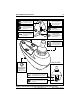
Basic Operation Instructions Remote Plus Controller Features Figure 1 provides information on the Remote Plus components and connections. Use this diagram to familiarize yourself with the function and location of each component before using the Remote Plus Controller. The following functions are available with the Remote Plus Controller: ! Joystick Control The joystick is used to control the direction and speed of the power chair.
Basic Operation Instructions 9 On/Off Button Battery Condition Meter Press to power on or off the power chair and controller. Indicates the approximate amount of battery life using color-coded LED bars. Mode Button Used to select the various functions available with the Remote Plus. Horn Button Activates a warning horn. Actuator Indicators Four LEDs indicate recline, tilt, power leg rests, and elevating seat actuator modes.
Basic Operation Instructions OPERATING THE REMOTE PLUS CONTROLLER The Remote Plus Controller is used to operate your power chair and all of its components. The Remote Plus controller consists of (see figure 2): 1. joystick 2. keypad 3. controller communications connector 4. 3-pin off-board charger/programming socket 5. power module 6. intermediate harness with charger connection Joystick Control The joystick controls the direction and speed of your power chair.
Basic Operation Instructions 11 1 2 6 4 5 3 Figure 2. Remote Plus Controller Figure 3. 3-Key Controller Keypad Figure 4. 7-Key Controller Keypad www.pridemobility.
Basic Operation Instructions Mode Key (Speed Settings) The mode key controls the speed settings. The Remote Plus speed settings range from 1 to 5. Typically, the slowest speed setting is 1 and the fastest speed setting is 5. The settings are indicated by the number of lights that are lit on the speed setting indicator. NOTE: The speed settings are preset at the factory. If your authorized Pride Provider changes the order of these settings, please make note of these changes.
Basic Operation Instructions 13 NOTE: If you still get “ripple up and down of lights,” contact your authorized Pride Provider. NOTE: When the batteries approach a discharged state, the red lights will begin to slowly flash, reminding you the batteries need to be charged immediately! Right/Left Turn Indicator Keys (For Optional Equipment) The right/left turn indicator keys toggle either the left or right turn indicators. Press once to turn on and press again to turn off.
Basic Operation Instructions WARNING! Only chargers with Neutrik NC3MX plugs should be connected to the 3-pin off-board charger/programming socket. See your authorized Pride Provider for more information. NOTE: Changes to the programming can only be made by an authorized Pride Provider.
Basic Operation Instructions 15 SPEED ADJUSTMENT/PROFILE SELECT To select a speed setting: 1. Press the on/off key to power on the controller. 2. Press the mode key once. 3. To increase chair speed, push the joystick to the right. Each time you push the joystick, you will increase the speed setting in the speed setting indicator. 4. To decrease chair speed, push the joystick to the left. Each time you push the joystick, you decrease the speed setting in the speed setting indicator. 5.
Basic Operation Instructions FAULT CODES The battery condition meter will flash fault codes when the controller system detects an abnormal condition in the electrical system. All of the battery condition meter LEDs will flash a number of times quickly, then pause, then flash again. The battery condition meter will continue to flash the fault codes until the problem is fixed. The following table identifies the individual fault codes.
Basic Operation Instructions NOTES 17 CARE AND MAINTENANCE Refer to your power chair owner’s manual for proper cleaning and disposal instructions. WARRANTY For two (2) years from the date of purchase, Pride will repair or replace at our option to the original purchaser, free of charge, the controller or any of its components found upon examination by an authorized representative of Pride to be defective in material and/or workmanship. www.pridemobility.
Remote Plus Controller NOTES www.pridemobility.
Basic Operation Instructions NOTES www.pridemobility.
www.pridemobility.com www.prideservice.com www.quantumrehab.com Pride Mobility Products Corporation 182 Susquehanna Avenue Exeter, PA 18643-2694 USA Pride Mobility Products Company 380 Vansickle Road Unit 350 St. Catharines, Ontario L2R 6P7 Canada Pride Mobility Products Ltd. Unit 106, Heyford Park Camp Road Upper Heyford, Oxfordshire OX25 5HA Pride Mobility Products Australia Pty. Ltd. 21 Healey Road Dandenong, 3175 Victoria, Australia Pride Mobility Products Italia S.r.l. Via del Progresso - ang.