
User Manual



User Manual MultiPad PMT3407_4G
5
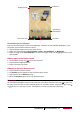
Googlesearch
Statusbar
Applications
andwidgets
On‐screenkeys
Listmenu
Personalise your wallpaper
PickyourfavouritephotoasyourHomewallpaper.Choosefromtheavailablewallpapers,oruse
anyphotoyouhavetakenwiththecamera.
1. TapandholdtheblankareaontheHomescreen.
2. Selectoneofthefollowing:ESFileExplorer,Gallery,Livewallpapers,orWallpapers.
3. SelectanimageandtapSetwallpaper.Or,selectanimage,resizeitbydraggingtheframe,and
thentapOK.
Add an app icon to Home screen
1. OntheHomescreen,tap toopenthelistmenu.
2. Tapandholdanapplicationicon.
3. Dragitintoapanelpreview.
Remove an item on Home screen
1. Tapandholdanitemtoremove.
2. TheRemoveoptionappearsatthetopoftheHomescreen.
3. DragtheitemtotheRemoveoption.
4. WhentheRemoveoptionturnsred,releasetheitem.
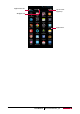
List menu
Allyourappsandwidgetscanbefoundonthelistmenu.OntheHomescreen,tap toopenthe
listmenu.Thelistmenucanhavemultiplepanels.Toviewotherpanels,swipeleftorright.Tap
or toreturntotheHomescreen.Yourtablet’slistmenuconsistsofthefollowing: