
User Manual



User Manual MultiPad PMT3407_4G
9
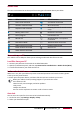
Status icons
Theiconsinthestatusbaratthetopofthescreengiveinformationaboutyourtablet:
Icons Whatitmeans Icons Whatitmeans
Silentmodeactivated. 3Gnetworkconnected.
Vibrationmodeactivated. Wi‐Ficonnected.
Airplanemodeactivated.
Roaming(outsideofnormalservice
area).
Batterypowerlevel. Bluetoothisactivated.
Callinprogress. ConnectedtoPC.
Missedcall.
Wiredeartablet+microphone
connected.
NewSMSorMMS. Wiredeartabletconnected
GPRSnetworkconnected. NoSIMcarddetected.
EDGEnetworkconnected. Alarmisset.
HSPAnetworkconnected.
Connect to your PC
Yourtablet’smicroUSBportallowsyoutoexchangemediaandotherfileswithaPC.
Load files from your PC
1. ConnectyourtablettothePCwiththeincludedUSBcable.
2. Openthenotificationspanel,andthentapConnectedasamediadevice>Mediadevice(MTP).
3. TransferfilesbetweenyourtabletandthePC.
Lock and unlock the screen
Whennotinuse,lockyourtablettopreventunwantedoperationsandsavethebatterypower.
• Lock:pressthepowerbutton.
• Unlock:pressthepowerbutton,andthenslidethelockicontounlockyourscreen.
Whenyourtabletislocked,nothinghappensifyoutouchthescreen.
Yourtabletcanstill:
• Receivecalls,textmessages,andotherupdates.
• Playmusic.
• Adjustthevolume.
Youcanusetheearphonestoansweracallorlistentomusic.
Auto lock
Youcansetatimespanforthescreentobelockedautomatically.
1. Onthelistmenu,tapSettings>Display>Sleep.
2. Selectyourdesiredtimespan.