
User Manual



User Manual MultiPad PMT3407_4G
7
3. Basics
Finger tips
Onlyuseyourfingerstousethetouchscreen.
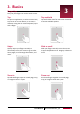
Tap
Toopenanapplication,toselectamenuitem,
topressanon‐screenbutton,ortoentera
characterusingtheon‐screenkeyboard,tapit
withafinger.
3
Tap and hold
Tapandholdanitemformorethan2seconds
toaccessavailableoptions.
Swipe
Quicklyswipeyourfingerverticallyor
horizontallyacrossthescreentogotoother
homepages,scrollthroughdocuments,and
more.
Zoom in
Spreadtwofingersapartonawebpage,map,
orimagetozoominapart.
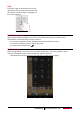
Slide or scroll
Slideyourfingerverticallyacrossthescreen
toopendrop‐downmenu.Dragupordownto
scroll.
Zoom out
Pinchtwofingerstogetheronawebpage,
map,orimagetozoomoutapart.