
Operation Manual






EN - 15
Quick Start Guide
Prestigio MultiBoard
EN
6. Technical specifications
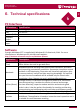
PC Interfaces
PC Interface Specification
WIFI 802�11b/g/n (2�4GHz)
USB 2 x USB 2�0
Lan Port(RJ45) 1
Earphone
Output
1
Microphone
Input
1
Software
Prestigio Multiboard 55" is supplied with Windows 8�1 Professional, 64 bit� For more
information on Windows version visit Microsoft website:
http://windows.microsoft.com/en-us/windows-8/meet
Application Description
Microsoft Office
(Trial)
From home to business, from desktop to web and the devices in between,
Office delivers the tools to get work done�
Mozabook
MozaBook expands teaching tools with versatile illustration, animation
and interesting presentation possibilities� Spectacular interactive content
and built-in skill-developing, illustrative and virtual lab applications help
to arouse students' interest and help acquiring knowledge� Full and free
one year license of mozaBook will be available only for schools after
completing a form� Request via email: multiboard@prestigio�eu�
mClass (Demo)
Prestigio mClass is a classroom management platform for multimedia
interactive teaching� It enables the teacher to control and manage
the class effectively, supervise student activities and maintain good
order in class� It has the perfect functionality for teaching and learning,
communicating and collaborating with each other and between groups�
TeamViewer The All-In-One Software for Remote Support and Online Meetings�
EasiNote
EasiNote is an interactive software application offered with Prestigio
MultiBoard� The application is based on interactive touch operation and it
is suitable for smart classroom teaching�
6