
Operation Manual






EN - 13
Quick Start Guide
Prestigio MultiBoard
EN
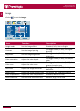
Use the multimedia function
1� Connect your MultiBoard to a USB device�
2� Press the signal source button on the remote control to select the USB signal source�
3� Press the " " key�
4� Press the left/right buttons on the remote control to select a file directory - Photo, Music,
Movie or Text�
• Some USB storage devices may not be fully compatible with the MultiBoard�
• Not all the multimedia files can be played on the MultiBoard, for example some
specific formats�
• Do not remove the USB storage device while file playback, it may cause the device
or system fault�
• The systemsupports standard USB disks and mobile HDDs under USB1�1 and USB
2�0�