
Operation Manual






EN - 12
EN
Quick Start Guide
Prestigio MultiBoard
Item Function Description
Menu language Set the language Chinese or English
Menu display time Set the menu display time 15s, 30s, 45s or 60s
Menu transparency Set the menu transparency
The bigger value (0-100), the higher
transparency
Blue screen
Set whether to enter the blue
screen if there is no signal
On or Off
Sleep timer
Set a time span for enter
standby automatically
Off, 15min, 30min, 45min, 60min,
90min, 120min or 240min
System reset Reset the system Restore to the default factory settings
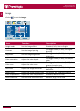
PC
• Select to set the PC�
Item Function Description
Auto adjust Auto adjust the screen
Press the right key on the remote
control to auto adjust to the best
display effect�
Horizontal position Adjust the horizontal position Move the screen display left and right
Vertical position Adjust the vertical position Move the screen display up and down
Freqency Adjust the frequency
Adjust the frequency to track stability
and definition
Phase Adjust the phase
Adjust the phase of the pixel
frequency