
Operation Manual






EN - 10
EN
Quick Start Guide
Prestigio MultiBoard
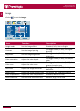
Image
• Select to set the Image�
Item Function Description
Image mode Set the image effect Standard, Soft, User or Bright
Contrast Set the image layering
The bigger value (0-100), the higher
layering
Brightness Set the image brightness
The bigger value (0-100), the higher
brightness
Color saturation Adjust the color depth
The bigger value (0-100), the deeper
color
Color tone Adjust the color tone
The bigger/smaller value (0-100), the
greener/purpler tone
Definition Adjust the image definition
The bigger value (0-100), the higher
definition
Aspect ratio Adjust the image display scale Full Screen, 4:3, Subtitle or Movie
Color temperature Adjust the color temperature Standard, Warm or Color
Noise reduction Set the noise reduction level Medium, High, Off or Low