
Operation Manual






EN - 8
EN
Quick Start Guide
Prestigio MultiBoard
10
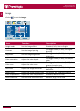
Volume +/- Press to turn up or lower the volume�
11
Signal source Select the the signal source
12
INFO Display the screen information
13
Aspect ratio Set aspect ratio of the display
14
Null No function
15
Sleep Set a time span to power-off automatically
16
Color temperature Set the color temperature
17
Function keys Operations in the USB mode
Insert the batteries
1� Remove the cover on the rear of the remote control�
2� Insert two “ AAA” batteries (1�5V) and care to respect the polarities:
- + on the battery against +,- on the battery against - � Please do not mix the batteries�
3� Replace the cover by aligning the new batteries in the base of the remote control and
pressing it back into place�