
Operation Manual






EN - 21
Quick Start Guide
Prestigio MultiBoard
EN
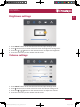
Screen settings
1� In Android mode, press INPUT button on the remote control enter settings menu�
2� Press button on the remote control to enter the advanced settings menu�
3� Press the / / / button on the remote control to adjust the parameter�
4� Press the return key on the remote control to exit�
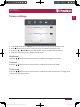
Brightness
Press the / button on the remote control to adjust the brightness of image�
Contrast
Press the / button on the remote control to adjust the contrast of image�
Color temp
Press the / button on the remote control to adjust the color temperature of image (Cool
color/warm color/auto matic)�
PMB718G988 848,PMB554G558 658 708_QSG Book.indb 23 2015/1/30 11:35:41