
Operation Manual






EN - 20
EN
Quick Start Guide
Prestigio MultiBoard
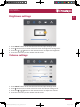
VGA Channel settings
1� In VGA mode, press INPUT button on the remote control enter settings menu�
2� Press button on the remote control to enter the advanced settings menu�
3� Press the / / button on the remote control to adjust the parameter�
4� Press the return key on the remote control to exit�
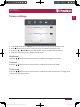
H position
Press the / button on the remote control to adjust the horizontal position of image�
V position
Press the / button on the remote control to adjust the vertical position of image�
Phase
Press the / button on the remote control to adjust the phase position of image�
Clock
Press the / button on the remote control to adjust the phase clock of image�
Aspect ratio
Press the / button on the remote control to adjust the aspect ratio�
Auto fit
Press Enter button on the remote control to automatically adjust horizontal, vertical
position/phase and clock of image�
PMB718G988 848,PMB554G558 658 708_QSG Book.indb 22 2015/1/30 11:35:41