
Operation Manual






EN - 18
EN
Quick Start Guide
Prestigio MultiBoard
6. General settings
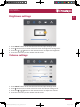
Set up your MultiBoard
Follow the steps to finish settings:
1� Plug the POWER cord and switch on the power�
2� Press INPUT on the remote control to enter settings�
3� Press
or to select the settings item�
4� Press ENTER if you want to set the desired item�
5� Select the parameter by pressing
or �
6� Press ENTER to confirm your selection�
7� Press INPUT again to go back to preview mode�
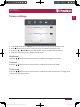
Input settings
1� Press INPUT button on the remote control enter input settings menu�
2� Press / / / button on the remote control to select the input source you need�
3� Press the Enter button on the remote control to confirm selected input source�
4� Press the return key on the remote control to exit�
6
PMB718G988 848,PMB554G558 658 708_QSG Book.indb 20 2015/1/30 11:35:41