
Conference Platform Hardware Guide




Table Of Contents
- Table of Contents
- Hardware Description
- Main Features
- RMX 2000 Specifications
- RMX 2000 System Capacities
- Site Requirements
- RMX 2000 Components
- RMX 2000 LEDs
- MPM/MPM+ and MPMx Configuration Modes
- RMX Chassis Types
- Component Replacement
Chapter 1- Hardware Description
1-28
RMX Chassis Types
The RMX chassis can be of type A/B/C or D. The environmentally
friendly D-type chassis (indicated by the letter D in the Part Number) is
required for use with MPM+ card(s).
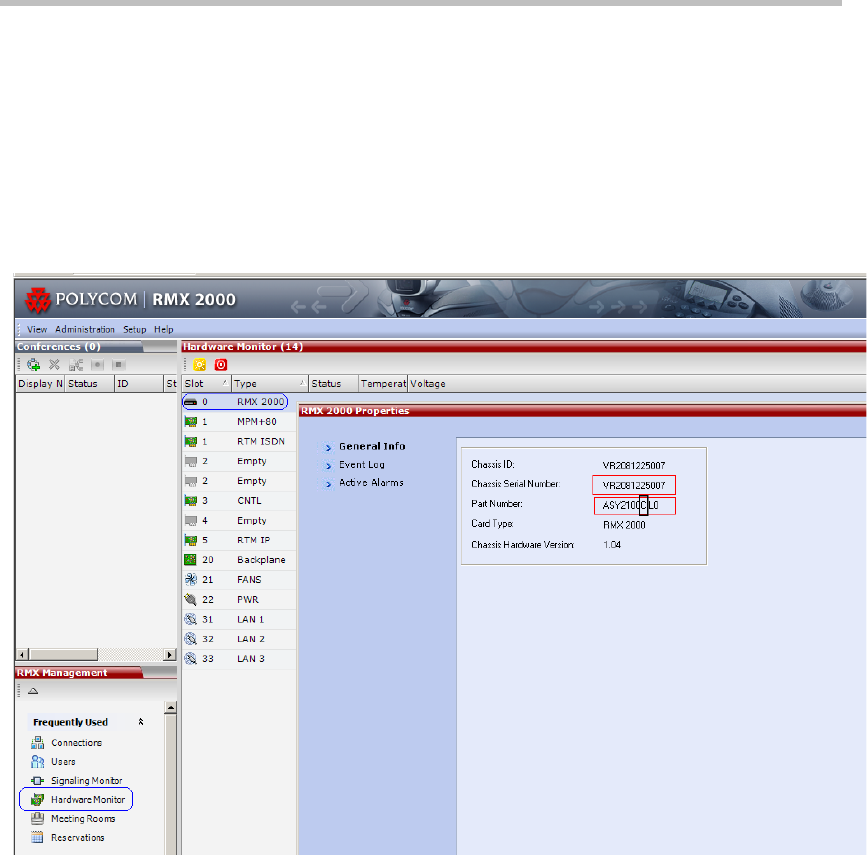
The chassis type can be viewed in the Hardware Monitor, by right
clicking Slot 0 and then clicking Properties.
The RMX 2000 - General Information dialog box opens.
The RMX Part Number contains the letter A/B/C/D that represents the
chassis type, as shown in the capture above.
For more details, see the RMX Administrator’s Guide, Chapter 19, “RMX
Hardware Monitoring” .