
Digital Camera User Guide Flash 640 SE


Table Of Contents
- Contents
- Table des matières
- Polaroid Fun
- Eléments de l'appareil photo
- Insertion des piles
- Prise de vue
- Utilisation du mode veille
- Utilisation du compteur de vues
- Utilisation du flash
- Utilisation du retar ateur
- Suppression de photos
- Transfert de photos vers votre ordinateur
- Modification es images
- Recadrage des images
- Sauvegarde des images
- Précautions d'emploi
- Garanties limitées du produit
- Conformité du produit
- Des questions ?
- Inhalt
- Willkommen bei Polaroid Fun
- Kamerafunktionen
- Einlegen von Batterien
- Aufnehmen von Fotos
- Verwenden des Abschaltmodus
- Verwenden des Bildzählers
- Verwenden des Blitzes
- Verwenden des Selbstauslösers
- Löschen von Fotos
- Übertragen von Fotos auf Ihren Computer
- Ändern von Bildern
- Sicherheitshinweise zur Kamera
- Beschränkte Produktgarantie
- Produktkompatibilität
- Noch Fragen?
18 Questions?
Contact Polaroid Corporation at
www.polaroiddigitalEU.com
English
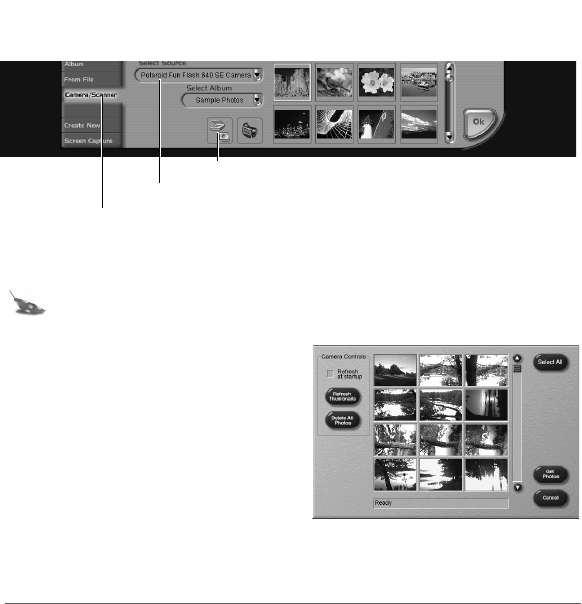
2. Click Camera/Scanner.
The Select Source list appears.
3. Select Polaroid Fun Flash 640 SE Camera.
4. Choose the destination album for your photos from the Select Album list.
Note: To create a new album, select [New] and use the album named New Album1
or enter a different album name.
5. Click the Acquire button.
The digital camera TWAIN software window
opens. TWAIN software is used to transfer,
delete, and save photos from your camera.
6. Click Refresh Thumbnails to display
your photos in the TWAIN window.
7. Click on a photo thumbnail to select it for
transfer to your computer.
To transfer more that one photo, press
Control (Ctrl) on your keyboard while you click on each thumbnail image.
To transfer all of the photos from the camera, click Select All.
Camera/Scanner button
Select Source list
Acquire button
640SEcdqs.book Page 18 Tuesday, December 5, 2000 4:46 PM