
Digital Camera User Guide Flash 640 SE


Table Of Contents
- Contents
- Table des matières
- Polaroid Fun
- Eléments de l'appareil photo
- Insertion des piles
- Prise de vue
- Utilisation du mode veille
- Utilisation du compteur de vues
- Utilisation du flash
- Utilisation du retar ateur
- Suppression de photos
- Transfert de photos vers votre ordinateur
- Modification es images
- Recadrage des images
- Sauvegarde des images
- Précautions d'emploi
- Garanties limitées du produit
- Conformité du produit
- Des questions ?
- Inhalt
- Willkommen bei Polaroid Fun
- Kamerafunktionen
- Einlegen von Batterien
- Aufnehmen von Fotos
- Verwenden des Abschaltmodus
- Verwenden des Bildzählers
- Verwenden des Blitzes
- Verwenden des Selbstauslösers
- Löschen von Fotos
- Übertragen von Fotos auf Ihren Computer
- Ändern von Bildern
- Sicherheitshinweise zur Kamera
- Beschränkte Produktgarantie
- Produktkompatibilität
- Noch Fragen?
Questions?
Contact Polaroid Corporation at
www.polaroiddigitalEU.com
15
English
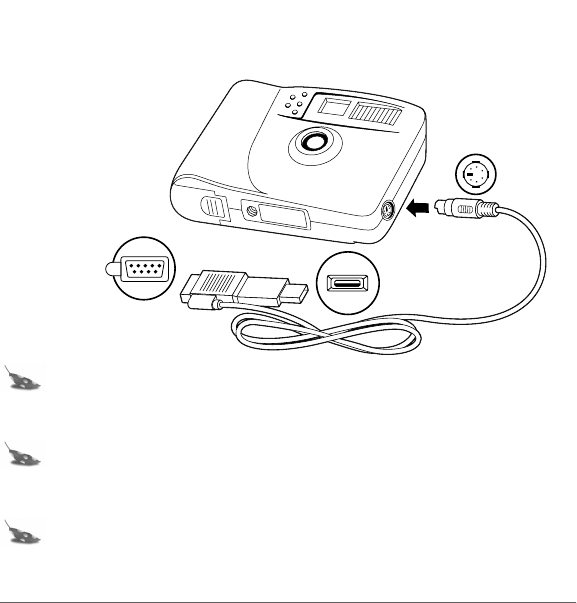
3. Connect the serial head of the cable (a) to the serial port on your Windows 95, Windows 98, or
Windows Me computer. Or connect the USB head of the cable (b) to the USB port on your
Windows 98 or Windows Me computer.
Note: If the connection between the USB head and the computer USB port is not tight, the
USB head may eventually pull out of the port. Check that the USB head is fully
plugged in every time you transfer photos.
Note: To get help finding the serial or USB port on your computer, read the instruction
manual that came with your computer or contact the computer manufacturer.
4. Connect the other end of the cable to the camera (c).
Note: When inserting the plug into the camera, the arrow on the plug should face the
camera front. Insert the plug straight into the port and do not turn or twist the plug.
c
b
a
640SEcdqs.book Page 15 Tuesday, December 5, 2000 4:46 PM