
User's Manual DATA PROJECTOR U4-232, U4-232h
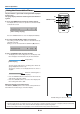
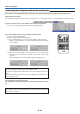
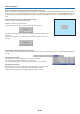
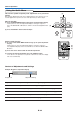
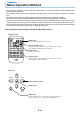
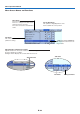
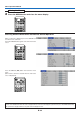
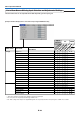
Table Of Contents
- INDEX
- English
- IMPORTANT SAFETY INFORMATION
- Major Features
- Table of Contents
- Checking the Supplied Accessories
- Names of the Main Unit Parts
- Names of the Remote Control Parts
- Preparing the Remote Control
- The Procedure Up to Projecting to the Screen
- Placement Guide
- Connecting Personal Computers and Video Equipment
- Power Cable Connections and Switching the Power On/Off
- Adjustment of the Projection Screen
- General Operation
- Input Selection
- Automatic Adjustment of Analog RGB
- Selection of Aspect Ratio
- Freezing a Moving Picture
- Cancelling Video and Audio Temporarily
- Lamp Mode
- Keystone
- Adjustment of the Volume
- Enlargement of the Image and Video Movement
- Using the Presentation Timer
- Protecting the Projector with the Security Lock
- Using the Quick Menu
- Menu Operation Method
- Image
- Color
- View
- Setup
- Option
- Info.
- When an Indicator is Lit or Blinking
- Troubleshooting
- Cleaning
- Replacing the Lamp Cartridge
- Specifications
- Table of Supported Frequencies
- Cabinet Dimensions
E-35
Menu Operation Method
• This section describes only the menu operation method. Please see this item should you need information while
performing menu operations.
• For information about a menu function, adjustment, or setting, please see one of the pages containing such descrip-
tions.
• Adjustments and settings are made by projecting an image and adjusting to an optimum condition.
• The remote control should be pointed toward the remote control sensor of the projector and operated.
• To return the various items that have been changed via the menu to their standard values (i.e., default values at time
of shipping from the factory), see “Factory Default” on Page E-53. (Some items will not return to their initial values.)
• The adjustment/setting items and contents will differ depending on the input selection and the adjustment/setting
items that can be used with the input signal are displayed on the menu.
Names and Functions of Buttons Used for Menu Operations
RGB
STANDBY
VIDEO
FREEZE
MUTE
ECO AUTO
ASPECT
TIMER
VOL KSTN ZOOM
QUICK
MENU
Q
1234
CANCEL
ENTER
MENU button
Used for menu display and menu closure.
SELECT (왖왔왗왘) buttons
Used in the selection of menu names and item names as well
as in setting and adjusting the item contents.
CANCEL button
Used to return to menu name selection as well as to close the
menu (and the sub menu display).
ENTER button
Used to enter settings.
(Remote Control)
SELECT (왖왔왗왘) buttons
SOURCE AUTO
MENU
QUICK
MENU
(Main Unit)
ENTER button
MENU button
Used to display menus, to return to menu name selections,
and to close menus (i.e., closing sub menu displays).