
User's Manual DATA PROJECTOR U4-232, U4-232h
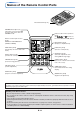
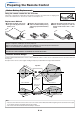

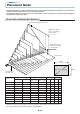
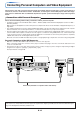


Table Of Contents
- INDEX
- English
- IMPORTANT SAFETY INFORMATION
- Major Features
- Table of Contents
- Checking the Supplied Accessories
- Names of the Main Unit Parts
- Names of the Remote Control Parts
- Preparing the Remote Control
- The Procedure Up to Projecting to the Screen
- Placement Guide
- Connecting Personal Computers and Video Equipment
- Power Cable Connections and Switching the Power On/Off
- Adjustment of the Projection Screen
- General Operation
- Input Selection
- Automatic Adjustment of Analog RGB
- Selection of Aspect Ratio
- Freezing a Moving Picture
- Cancelling Video and Audio Temporarily
- Lamp Mode
- Keystone
- Adjustment of the Volume
- Enlargement of the Image and Video Movement
- Using the Presentation Timer
- Protecting the Projector with the Security Lock
- Using the Quick Menu
- Menu Operation Method
- Image
- Color
- View
- Setup
- Option
- Info.
- When an Indicator is Lit or Blinking
- Troubleshooting
- Cleaning
- Replacing the Lamp Cartridge
- Specifications
- Table of Supported Frequencies
- Cabinet Dimensions
E-12
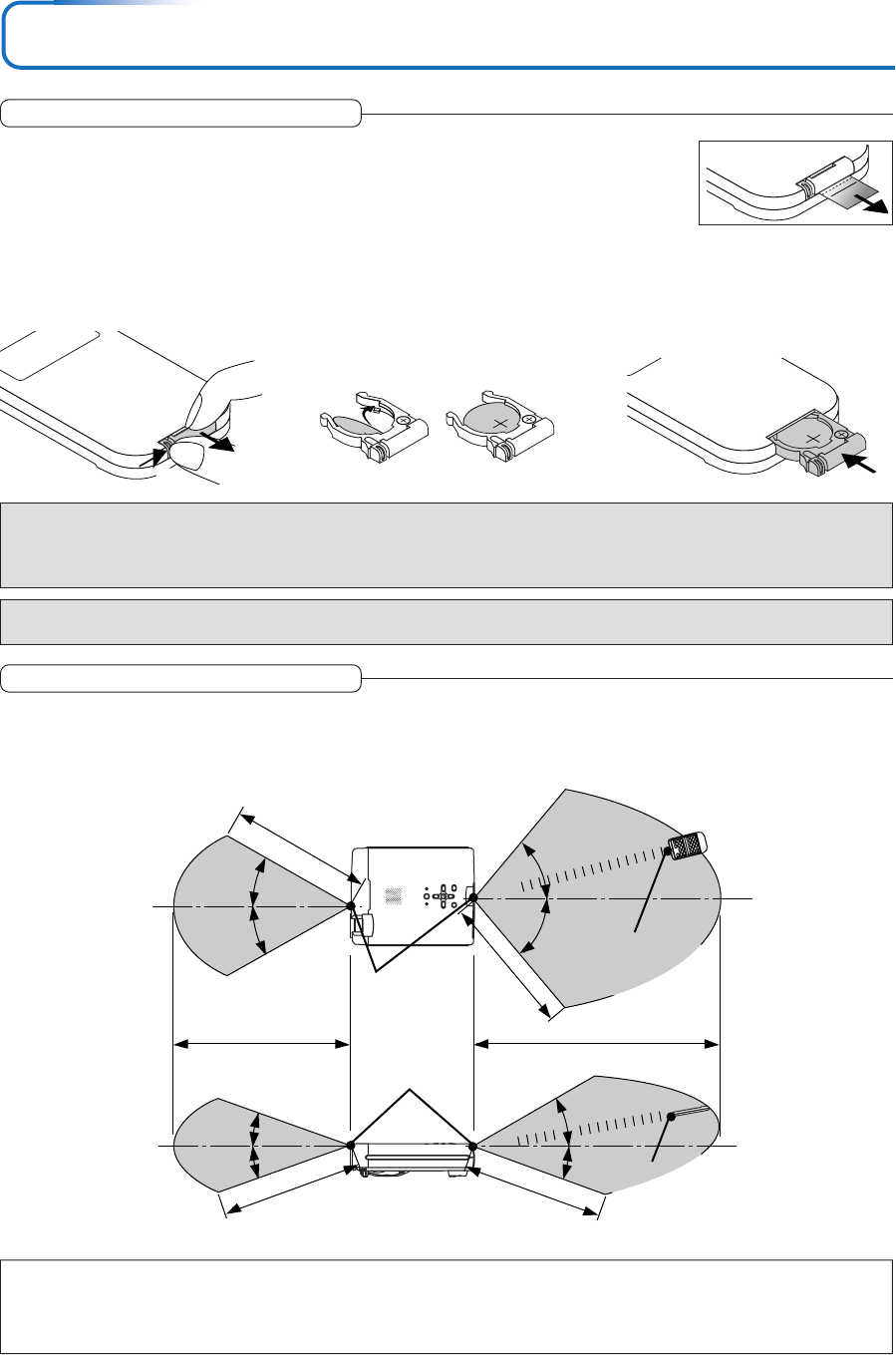
Using the remote control for the first time
The battery compartment is fitted with a transportation insulation sheet at the time of shipping. Pull
out the sheet and remove it. The remote control is now ready for use.
Replacement Method
1
(A) With the knob pressed to
the right side, (B) draw out the
battery case.
2
Remove the old battery and in-
stall a new button battery with (+)
side facing upward in the battery
holder.
3
Insert the battery holder into the re-
mote control and push in until the
battery holder closes with a “click”
sound.
(B)
(A)
CR2025
CR2025
CR2025
Purchase a CR2025 type battery for replacement.
CAUTION
Danger of explosion if battery is incorrectly replaced.
Replace only with the same or equivalent type (CR2025) recommended by the manufacturer.
Dispose of used batteries according to your local regulations.
Preparing the Remote Control
Remote Control Range
Point the infrared transmitter of the remote control toward the remote control sensor located at the front or rear of the main unit
and operate.
Reception of the remote control signal should generally be possible within the range illustrated below.
Note
* Exposure of the main unit's remote control sensor or the remote control infrared transmitter to bright light or the obstruction of the signal
by an obstacle located in the pathway may prevent operation.
* The remote control will not function when the battery is exhausted.
Button Battery Replacement
CAUTION
DISPOSE OF USED BATTERIES ACCORDING TO THE INSTRUCTIONS.
5m / 16.4 feet
30°
50°
50°
30°
20°
20°
4m/13.1 feet
7m / 23 feet
4m/13.1 feet
4m/13.1 feet
4m/13.1 feet
30°
20°
Side View
Top View
Remote control in-
frared transmitter
Remote control in-
frared transmitter
Remote con-
trol sensor
Remote con-
trol sensor