
User's Manual DATA PROJECTOR U4-232, U4-232h
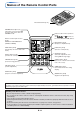
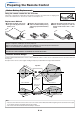

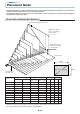
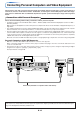


Table Of Contents
- INDEX
- English
- IMPORTANT SAFETY INFORMATION
- Major Features
- Table of Contents
- Checking the Supplied Accessories
- Names of the Main Unit Parts
- Names of the Remote Control Parts
- Preparing the Remote Control
- The Procedure Up to Projecting to the Screen
- Placement Guide
- Connecting Personal Computers and Video Equipment
- Power Cable Connections and Switching the Power On/Off
- Adjustment of the Projection Screen
- General Operation
- Input Selection
- Automatic Adjustment of Analog RGB
- Selection of Aspect Ratio
- Freezing a Moving Picture
- Cancelling Video and Audio Temporarily
- Lamp Mode
- Keystone
- Adjustment of the Volume
- Enlargement of the Image and Video Movement
- Using the Presentation Timer
- Protecting the Projector with the Security Lock
- Using the Quick Menu
- Menu Operation Method
- Image
- Color
- View
- Setup
- Option
- Info.
- When an Indicator is Lit or Blinking
- Troubleshooting
- Cleaning
- Replacing the Lamp Cartridge
- Specifications
- Table of Supported Frequencies
- Cabinet Dimensions
E-11
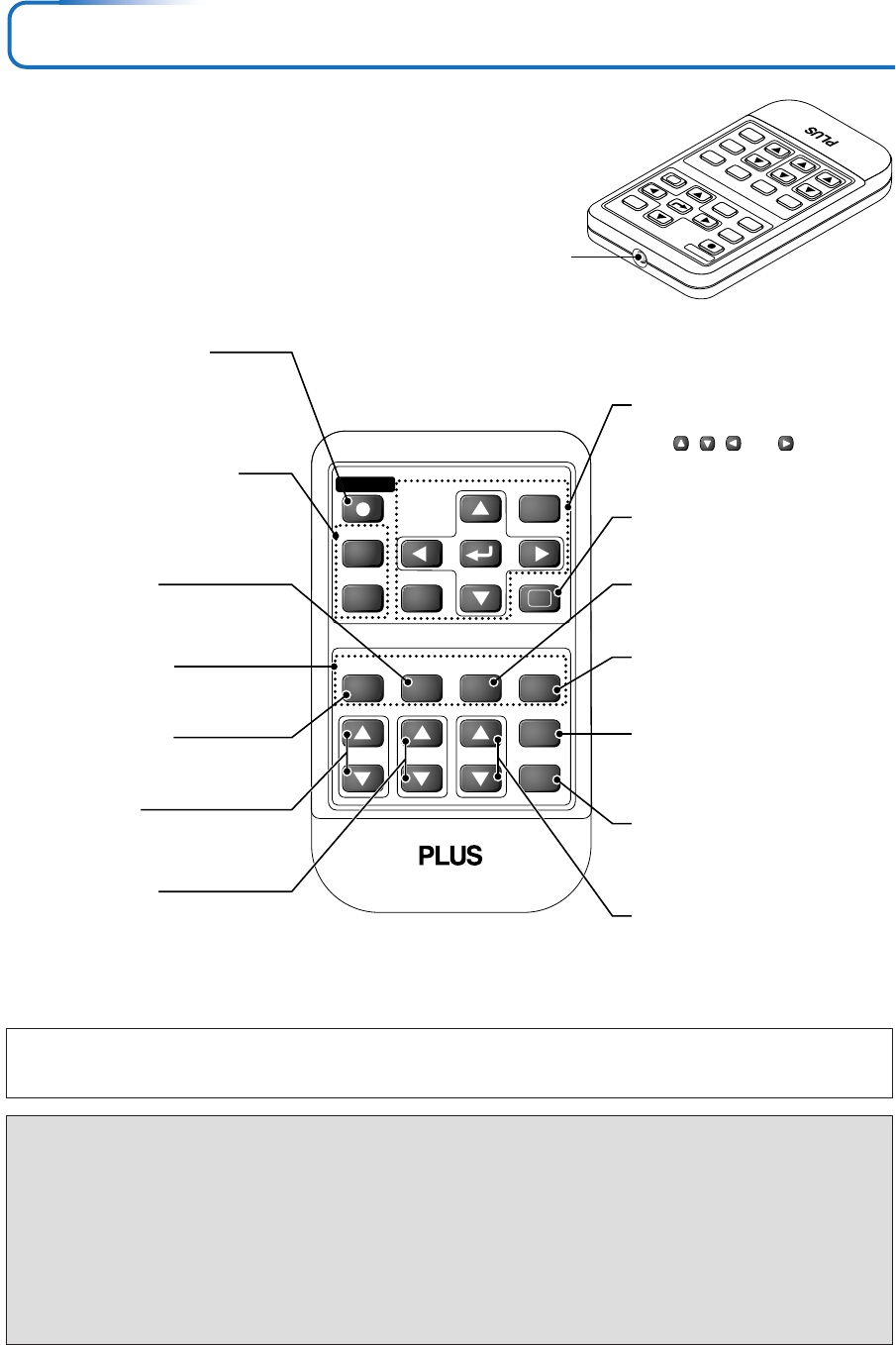
Names of the Remote Control Parts
RGB
VIDEO
FREEZE
MUTE
ECO AUTO
ASPECT
TIMER
VOL KSTN ZOOM
CANCEL QUICK
MENU
ENTER
Q
STANDBY
1234
Infrared transmitter [E-12]
VOL button [E-29]
(Volume adjustment)
STANDBY button [E-21, 23]
This button is used to switch ON
the power and set the unit to the
STANDBY mode.
AUTO button [E-26]
(Automatic adjustment of the
Analog RGB moving image)
Buttons used for menu operations
[E-35]
The , , and buttons are
the select (왖, 왔, 왗 and 왘) buttons.
FREEZE button [E-28]
(Freezes moving pictures)
MUTE button [E-28]
(Temporarily cancels the video and
audio)
TIMER button [E-31]
(Presentation timer time setting
display)
ZOOM button [E-30]
(Digital zoom adjustment)
Buttons used for input selection
[E-26]
RGB button and VIDEO button
(VIDEO / S-VIDEO)
QUICK button [E-34]
(Displays a simplified menu)
Number buttons [E-32]
(Used for the security lock.)
ECO button [E-28]
(Selection of lamp mode)
ASPECT button [E-27]
(Selects the vertical and horizontal
ratio of the screen)
KSTN button [E-29]
(Keystone correction adjustment)
R
GB
STANDBY
VIDEO
FREEZE
M
UTE
EC
O
AU
TO
ASPECT
TIMER
VO
L
K
STN
ZOOM
CANC
EL
QU
IC
K
MENU
ENTER
Q
1234
Note
If a button on the remote control unit is held in continuously for approximately 30 seconds, signal transfer will be suspended. To resume
transferring signals, press the button again.
Precautions
Handling of the Remote Control
* Do not drop the remote control or handle it inappropriately.
* Do not expose the remote control to water or other liquids. Should the remote control become wet, wipe it dry
immediately.
* Try to avoid use in hot and/or humid locations.
* Please keep button battery out of the reach of children. If a battery is swallowed, promptly obtain the medical care of
a doctor.
* Remove the battery from the remote control when it is not going to be used for a long period.
* Some operations (such as menu operations) are available only through the use of the remote control and attention
should be given to its careful handling.