
User manual




E-41
List of Item Names Offering Input Selection and Adjustments/Settings
The item names that can be adjusted/set will differ depending on the input signal.
“Tint” can be adjusted only at the time of NTSC composite/S signal input.
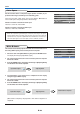
Menu Operation Method
[Example of Menu Display Items at the Time of Input Signal Analog RGB Selection]
Image Color View Setup Info.
Contrast
0
Picture Adj.
0
Fine Picture
48
H Position
0
V Position
0
Reset
Brightness
0
Analog RGB
Digital RGB
YPbPr
YCbCr
VIDEO
S-VIDEO
Menu name
Image
Color
View
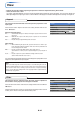
Brightness E-43
Item Name
Imput
Terminal
Sub Menu
Item Name
Contrast E-43
Picture Adj.
Fine Picture
E-43
H Position
E-44
V Position
E-44
Color
E-44
Tint
E-43
Sharpness
E-43
Reset
E-43
E-44
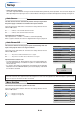
Gamma E-45
Color Temp. E-45
White E-45
Color Space
E-46
White Balance E-46
Aspect E-47
Filter E-47
Vertical Flip E-48
Horizontal Flip E-48
Keystone E-48
Keystone Save E-48
PC
Reperence
Page
Input Signal