
Manual



15
Link Light
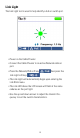
The Link Light test is used to help identify a hub or switch port.
▪ Power on the Cable Prowler.
▪ Connect the Cable Prowler to an active Network cable or
port.
▪ Press the Network/PoE soft key
then press the
Link Light soft key.
▪ The Link Light will automatically begin upon entering the
Link Blink menu.
▪ The Link LED above the LCD screen will ash at the same
cadence as the port light.
▪ Use the up and down arrows to adjust the transmit fre-
quency to suit the switch characteristics.