
Manual

10
SETUP
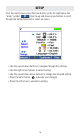
From the main screen, press the blue button on the far right below the
“setup” symbol . Use the up and down arrow buttons to scroll
through the Setup menu and to select an option.
▪ Use the up and down buttons to navigate through the settings.
▪ Use the right arrow buttons to select setting.
▪ Use the up and down arrow buttons to change the selected setting.
▪ Press the enter button
to accept your changes.
▪ Press the left arrow to unselect a setting.