
User guide


Table Of Contents
SWP-0412G2 Series L2 Web Smart Switch User Guide
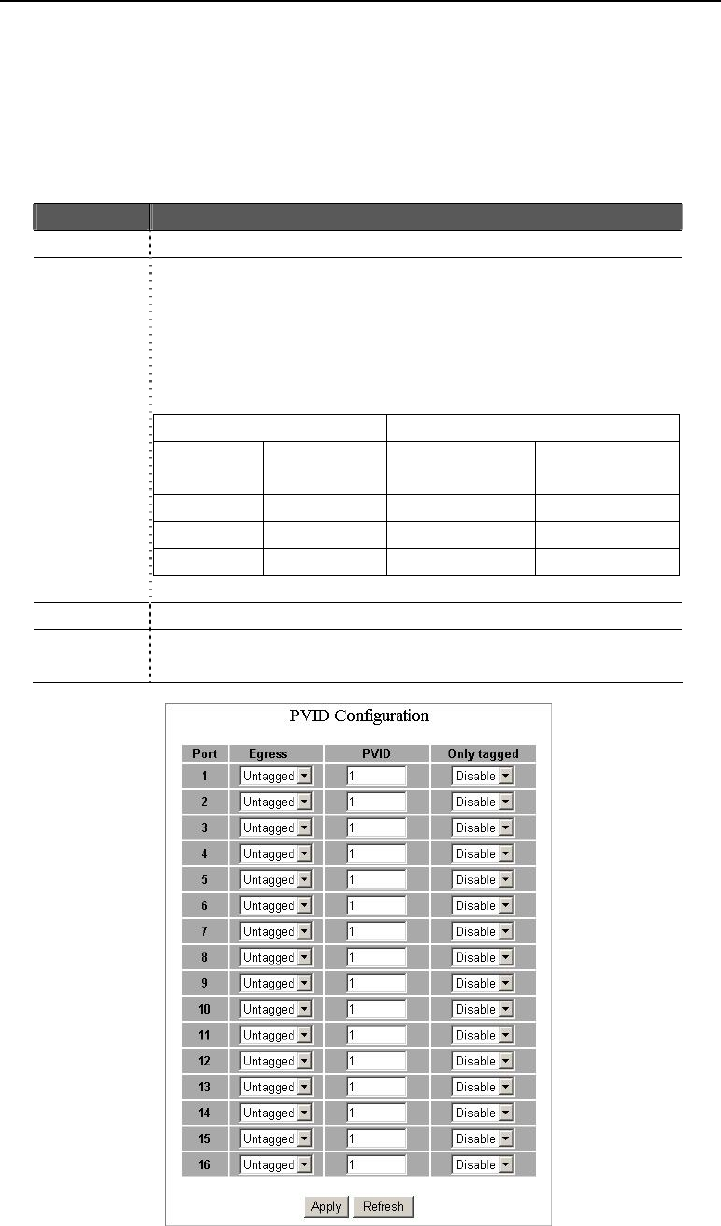
PVID
When the VLAN-enabled Switch receives a tagged packet, the packet will be sent to
the port’s default VLAN according to the PVID (port VLAN ID) of the receiving port.
Items Functions
Port Port Number 1~16
Egress Select “tagged” in the drop menu to enable the PVID checking
and tag inserting of one port, and select “untagged” to cancel.
For example, if an Egress-tagged port receives an untagged
frame, it will be transmitted as a PVID tagged frame. For the
detail tagging status, please refer to the following table.
Untagged Tagged
Packet
Frames In
Packet
Frames Out
Packet Frames
In
Packet
Frames Out
Untagged Untagged Untagged Tagged (PVID)
Tagged Untagged Tagged (VID) Tagged (VID)
Pri-tagged Untagged Pri-tagged Tagged (PVID)
PVID Port VLAN ID(1~4094)
Only
tagged
Enable: block all untagged packets from accessing this port.
Disable: All packets are allowed to access this port.
15