
User guide


17
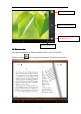
5, tab "Home" icon in the top left to re t urn to the main inferface, select "SD
card", Tab "Editor" icon, you will see a pop-up menu, select "Paste".
Files are copied from your tablet to your Micro SD card now.
Ⅸ .
.
.
. Battery
Battery
Battery
Battery
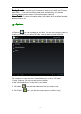
Very Low Battery Full Battery Charging Battery
‘ ’ indicates that the power of Battery is full. When the battery level becomes
too low, a prompt comes up to note you to charge your tablet.
While charging, you can check the charging status in the lock screen: