
User guide


15
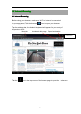
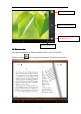
You can page up or page down by sliding your finger right or left.
T ab or the menu button to check the sub-menus. You can set the font
size, Go To Page jump, check your bookmarks, set the auto flip time, etc.
VII.
VII.
VII.
VII. Settings
Settings
Settings
Settings
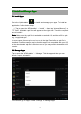
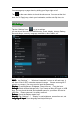
T ap the “ Settings ” icon to go to settings.
you can check and set wireless&networks, sound, display, storage, Battery,
Accounts &sync, security, language, date&time, about tablet, etc.
Wi-Fi:
Wi-Fi:
Wi-Fi:
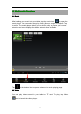
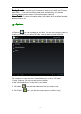
Wi-Fi: tap “ Settings ” → “ Wireless & networks ” to turn on wifi and scan. It
will show a list of Wi-Fi networks scanned in range. Choose a strong Wi-Fi
network to connect. (You may need to input the password).
Display:
Display:
Display:
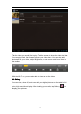
Display: To set Brightness, Wallpaper, Sleep time-out, Font size here.
Storage:
Storage:
Storage:
Storage: Check internal storage here. If you insert an Micro SD card, or USB
disk, you can check the total and available space for your Micro SD card or
USB disk. Please unmount it to safely remove it.
Battery:
Battery:
Battery:
Battery: Check the Battery status here.
D
D
D
D isplay:
isplay:
isplay:
isplay: Tab “ Settings ” → “ Display ” to set brightness, s creen time-out, etc.
Language
Language
Language
Language &
&
&
& input
input
input
input :
:
:
: to set language and keyboard input.